Chromium Crash Reporting and Stability Monitoring in Headless Deployments
Debugging silent crashes in headless Chrome deployments requires proper crash reporting setup.
Headless Chromium uses the full browser without a screen. When it crashes, no reason appears. No dialog box, no user to shrug at it, no "Aw, Snap!" page for anyone to screenshot. It just dies, and in some setups, there's no trace left behind. This article explains how Chromium's crash reporting works, why headless setups break its original assumptions, and what Chrome operators in Docker must set up themselves.
Production automation failures carry higher stakes than a laptop crash. If a tab crashes on a desktop browser, it bothers just one user. A renderer crashing in a pipeline generating ten thousand PDFs a day, or an AI agent mid-task, is a silent failure that delays queues for hours unnoticed. With Chrome 112, headless and headed code were combined into a single codebase. But headless removes all the usual signs that something’s gone wrong. Google released Chrome 132 in January 2025, removing the old headless mode from the main Chrome binary and packaging it separately as chrome-headless-shell. Teams that had been relying on the old behavior found their deployments failing without any clue why.
How Chromium's crash reporting systems actually work: Breakpad, Crashpad, and minidumps
Chromium's source tree includes two crash reporting systems, both located under //components/crash. Breakpad was the original crash reporter, working on multiple platforms, but it's being phased out. Crashpad took over and now manages crash reporting on Windows, Mac, Linux, Android, iOS, and Fuchsia.
Breakpad’s snag: open-source Chromium ships with it disabled. To send crash reports to Google, an official Google-branded build is required, which involves setting is_chrome_branded=true and is_official_build=true in the GN build arguments. That makes it tough, so most users of open Chromium, including almost all running headless Chrome in Docker, don’t get crash reports without extra steps. On Macs, Crashpad is always built in and active, but the crash reports stay on the local disk unless sent somewhere.
When either system catches an issue, it generates a minidump, a Microsoft binary format that writes memory (stacks, threads, registers) directly to disk without processing. The format's details live in minidump_format.h, and Linux versions add custom keys with /proc/cpuinfo and lsb-release info to identify the kernel and distro later.
Several components are key if you're running Crashpad. CrashpadHandler is the main interface a client uses to turn reporting on. It sets how each process acts. CrashReportDatabase settings determine if uploads occur, and they're off by default. Uploads remain off unless a client explicitly enables them through the library, typically after user consent. If you don't include the, url flag when starting the handler, uploads will act as though they're turned off, silently, without any error message.
Annotations play a key role. Crashpad allows adding key-value data to a crash report, often set via the client library to help identify issues during runtime. In a headless setup, these tags are how you link a minidump to a particular run: build number, job ID, session details. Without it, a stack of unannotated minidumps just shows Chrome failed. Nothing else.
After a dump is symbolized, the crash processor sorts reports using a signature made from common stack frames. After a dump is symbolized, the crash processor sorts reports using a signature, which helps manage crash analysis as volume increases.
Collecting crash dumps in Linux headless environments
To set up Linux minimally, use this environment variable: CHROME_HEADLESS=1. Set it, and Chrome saves crashes to disk instead of uploading, putting them in ~/.config/chromium/Crash Reports. It’s the save location when CHROME_HEADLESS=1 is set, so test it first, don’t wait until it’s live.
It's easy to test. Go to chrome://crash to force a renderer crash. Next, visit chrome://crashes to view metadata, timestamps, and upload status for all collected dumps. If a dump appears there, the pipeline is working.
You need a few tools to symbolize a dump not sent to Google. minidump_stackwalk shows a complete stack trace for all threads in the dump and can be compiled from Chromium or Breakpad source. Another option is crsym, designed for symbolizing local dumps. Google’s servers store Breakpad symbol files that work on any OS, covering Chrome’s code and the system libraries it uses, so those address lists become real function names, Chrome’s and the OS’s.
What comes out the other end is a stack signature, and that's the whole difference between "Chrome crashed" and "this renderer crashed specifically because of X." One of those tells triage nothing. The other is exactly why we do this in the first place.
A common issue keeps catching people out: the collection process relies on a writable filesystem. Containers with a read-only root, often used for security, won't save crash reports unless a writable volume is mounted there or Crashpad's database is redirected to a writable location.
The Crashpad flag problem in containerized and sandboxed headless deployments
There's a documented Puppeteer and Chromium engineering issue where headless Chrome ignores --disable-breakpad and launches Crashpad anyway. It’s been reported for further review. It hasn’t been fixed.
In constrained environments, where namespace sandboxing and ptrace attachment are unavailable, in headless=new setups in Docker, things get worse. There, Crashpad causes instability even with all three obvious disabling flags passed together: --disable-breakpad, --disable-crash-reporter, and --disable-crashpad-for-testing. The chrome_crashpad_handler process still launches regardless. Flags or no flags.
One workaround involves rebuilding Chrome with --disable-crashpad-for-testing forwarded to subprocesses, combined with --no-zygote. That requires forwarding the flag to subprocesses at build time, more work than most teams figure on just to disable crash reporting.
Let's be blunt: anyone thinking those three flags fully disable Crashpad in a Docker image is mistaken and likely has extra handler processes running now, wasting memory and CPU. It’s worth asking straight up: is the supposed instability tracked for weeks actually caused by the Crashpad handler, not the bug blamed for it? At the time of this writing, the issue remains unresolved upstream. See what the handler is doing in the container. Don't believe the flags.
Chromium's source tree includes two crash reporting systems, both located under //components/crash.
The OOM crash pattern: why containerized Chrome runs out of memory and what to do about it
For each page, Chrome launches a dedicated renderer process. Running ten screenshots at once creates ten renderers, each consuming significant memory. If you hit a load spike without a concurrency limit, the kernel's OOM killer kills a process. No alerts, no pop-ups, no minidump.
Docker may cap shared memory at 64MB, while Chrome uses /dev/shm for shared memory by default. With just 64MB, normal use quickly runs out of memory, causing frequent Chrome crashes in Docker that are simple to solve. disable-dev-shm-usage redirects allocation to /tmp. Never run Chrome in Docker without this flag, leave it out and you’ll get crashes that seem random.
Using, no-sandbox actually makes the problem worse, not better. When the sandbox is off, each renderer process allocates shared memory straight away, and if /dev/shm is set too low, these allocations fail and cause OOM crashes in the renderer.
Another, subtler memory issue lurks. If , disk-cache-size isn't set, Chrome may use in-memory cache to speed warm-started content. Works well for a single session. As the process runs continuously and handles task after task, the cache steadily grows.
Teams often hunt the wrong bug here. Chrome may hold onto cached resources after a tab shuts, hoping the next page load will need them. Those cached resources quickly accumulate in a high-throughput headless setup that runs hundreds of jobs hourly, making memory usage rise just like a leak. It isn't one. To fix this, clean up resources between jobs and set strict concurrency limits, instead of wasting a week profiling memory for a non-existent leak.
Zombies also cause issues. If Chrome crashes while working, the browser process sometimes doesn't shut down completely. It lingers, using CPU and memory, and the scheduler still thinks the slot is free, giving it another job. Using tini as the Docker entrypoint helps by cleaning up lingering processes. Combine that with navigation timeouts that always end, and the zombie problem mostly goes away.
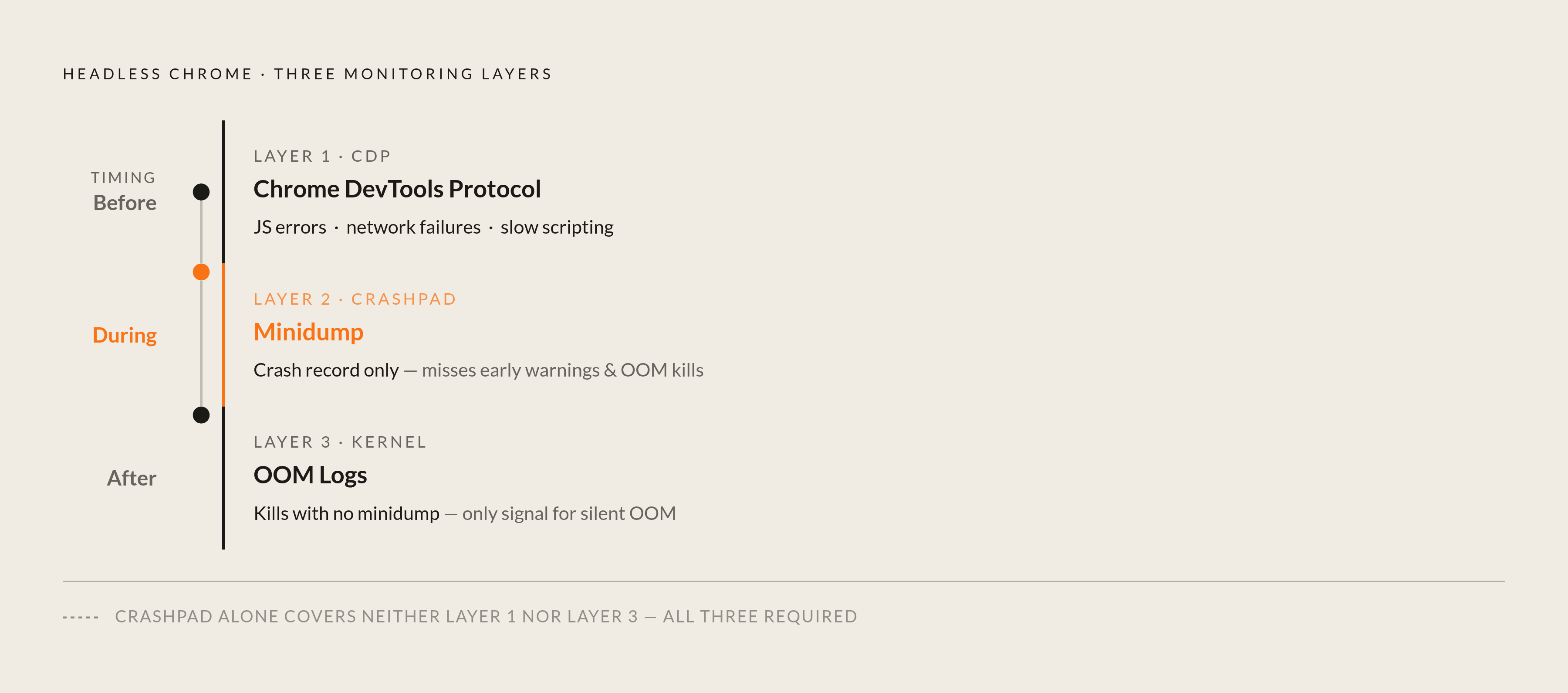
The issue here is that a kernel OOM kill doesn't generate a Crashpad minidump, since the process is terminated externally, not by its own crash handler. If you only check crash reports, you'll never see any OOM events. The only real signal is kernel OOM log lines, checked against process-level RSS over time.
Mid-session crash sources beyond OOM: GPU errors, JS exceptions, and hanging pages
A session can crash for other reasons too. GPU errors can outright kill a renderer process, sometimes leaving no minidump. The usual fix is, disable-gpu, but it turns off GPU-accelerated rasterization, a tradeoff with a real cost.
JavaScript errors form a distinct category of failures. If an exception isn’t caught, it can crash the session and wipe out cookies, navigation history, and page state. The upside is that CDP can catch these exceptions before they crash the whole process, which is crucial for monitoring systems.
Sometimes, Chrome crashes because it can't process certain pages, ending up with the same result.
Timeouts need special attention since they’re nothing like crashes. Without an explicit timeout, if a page gets stuck loading from network flakiness, an infinite rendering loop, or a failing external resource, that Chrome instance just sits indefinitely, holding a slot and doing nothing. There's no crash signal. It seems like a normal process, though unusually silent. That's the problem: tools made just for crashes won't spot a hang at all, because a hang requires a watchdog timer and a forced kill, but a crash needs minidump collection. Focusing on one means the other goes unnoticed.
Puppeteer and Playwright start Chrome without a visible window by default. Puppeteer communicates with Chrome via the DevTools Protocol; Playwright uses CDP for Chromium, but other protocols for Firefox and WebKit. Both tools offer navigation timeout settings, which in Node.js automation stacks serve as the key mechanism operators use to prevent hangs from silently consuming resources.
Using CDP as an active monitoring layer for headless process health
You don't need CDP, the Chrome DevTools Protocol, just to open the inspector panel manually. It lets you tap into logs, warnings, and errors in real time, track network traffic like requests and responses, including failed external resources before they cause hangs or crashes, inspect the DOM, and monitor performance data such as frame rate, scripting time, and layout shifts.
Docker users face a genuine operational pitfall here. In Chromium M113, the flag, remote-debugging-address=0.0.0.0 is now forcibly redirected to 127.0.0.1, silently preventing external CDP connections that previously functioned without issue. This update breaks things, but you can fix it by sending port 9222 traffic to 127.0.0.1:9223 with socat.
Take a moment to consider this: connecting a CDP client involves more than just observing. It changes the browser's state, triggering events, making object previews, creating and naming execution contexts, and some changes are visible to the inspected page. It’s something scrapers need to watch out for when sites check for bots.
The protocol is defined in browser_protocol.pdl and js_protocol.pdl within the Chromium source, which the DevTools team maintains, and its binding layer is directly visible in Chrome Headless's C++ interface. Knowing which parts of those files to check cuts down on the guesswork about which CDP domain handles a specific monitoring task.
Together, the three layers address distinct parts of the same failure surface, but none can do the job alone. CDP spots issues before they crash Chrome, like more JS errors, network failures, and slower scripting. Crashpad records the crash afterward in the form of a minidump. Kills without a minidump are noted in Kernel OOM logs. This is the main point of the whole article: headless Chrome isn't set up by default for layered monitoring, so it needs to be added.
Security-triggered crashes and the Blink architectural vulnerability class
Some crashes are deliberate. Researcher Jose Pino revealed a flaw called "Brash" on October 29, after telling Google about it on August 28 and getting no response before announcing it publicly. Blink's flaw is its failure to limit how often the document.title API can be updated, allowing millions of title changes per second to overwhelm the main thread and crash the browser.
Pino's tests showed the same pattern in all browsers: CPU spikes in five seconds, a frozen tab in ten, a crash or "Page Unresponsive" dialog in fifteen, and a force quit needed in fifteen to sixty seconds.
Nine out of the eleven browsers tested were vulnerable: Chrome, Edge, Vivaldi, Arc, Dia, Opera, Perplexity Comet, ChatGPT Atlas, and Brave. Firefox (Gecko) and Safari (WebKit) avoided the issue, as their architecture isn't Blink's. All the iOS browsers passed, because Apple makes them use WebKit no matter their name. This is a clear natural test: identical exploit, different rendering engine, different result. This clearly shows it's an architectural issue, not a typical Chrome-specific bug.
The exploit impacts Chromium versions 143.0.7483.0 and below, with no reports on the public tracker by October 30.
Pino's documentation says the exploit, for headless enterprise deployments, can be time-triggered, remaining dormant until a moment like market open or a peak operations window. It transforms a browser glitch into a precise attack on an automated system, set to hit at the worst possible moment. No security layer, hardening, CSP, isolation, or extension blocks, works, since the bug sits deep in Blink itself.
Another distinct issue, CVE-2026-4678, is a use-after-free bug in WebGPU that affects Chrome versions before 146.0.7680.165 and lets attackers run code inside the sandbox via a crafted HTML page. It's especially relevant for headless deployments, because rendering untrusted external pages at scale is what many of these pipelines are designed to do.
Google fixed at least six zero-day bugs in Chrome during 2024. Unlike the Chrome zero-days, the Blink rate-limiting flaw behind Brash received no public acknowledgment when Pino disclosed it. If you're using Chrome headless on unknown pages, you might wonder: Are there more hidden flaws in Blink that haven't been fixed because the right API hasn't been overwhelmed?
Sources
- Chromium Docs - Linux Crash Dumping
Sourced the CHROME_HEADLESS=1 environment variable and the crash dump save path details for Linux headless setups.
- GitHub - chromium/crashpad: A crash-reporting system
Provided the overview of Crashpad as the successor crash reporting system across platforms.
- Crash Reports
Provided the build flag requirements (is_chrome_branded=true) needed to enable crash report uploads in official Chromium builds.
- crashpad/doc/overview_design.md at main · chromium/crashpad
Provided the description of CrashpadHandler as the main client interface and the role of CrashReportDatabase in controlling uploads.
- https://chromedevtools.github.io/devtools-protocol/
Cited as the authoritative reference for the Chrome DevTools Protocol used for real-time monitoring of headless browser sessions.
- Chromium flaw crashes Chrome, Edge, Atlas: Researcher publishes exploit after Google’s silence
Provided details on the 'Brash' exploit, Jose Pino's disclosure timeline, the list of affected browsers, and the architectural analysis of the Blink rate-limiting flaw.