Playwright vs Puppeteer for Production Automation
Playwright dominates production automation where reliability and cross-browser coverage matter most.

Playwright and Puppeteer both automate browsers, but they solve different problems in production, and the gap between them shows up exactly where it hurts: reliability at scale, cross-browser coverage, and how much custom tooling you have to bolt on before a test suite actually behaves. This piece walks through why, using the numbers and the architecture.
Where adoption stands in 2025–2026 and what the numbers actually signal
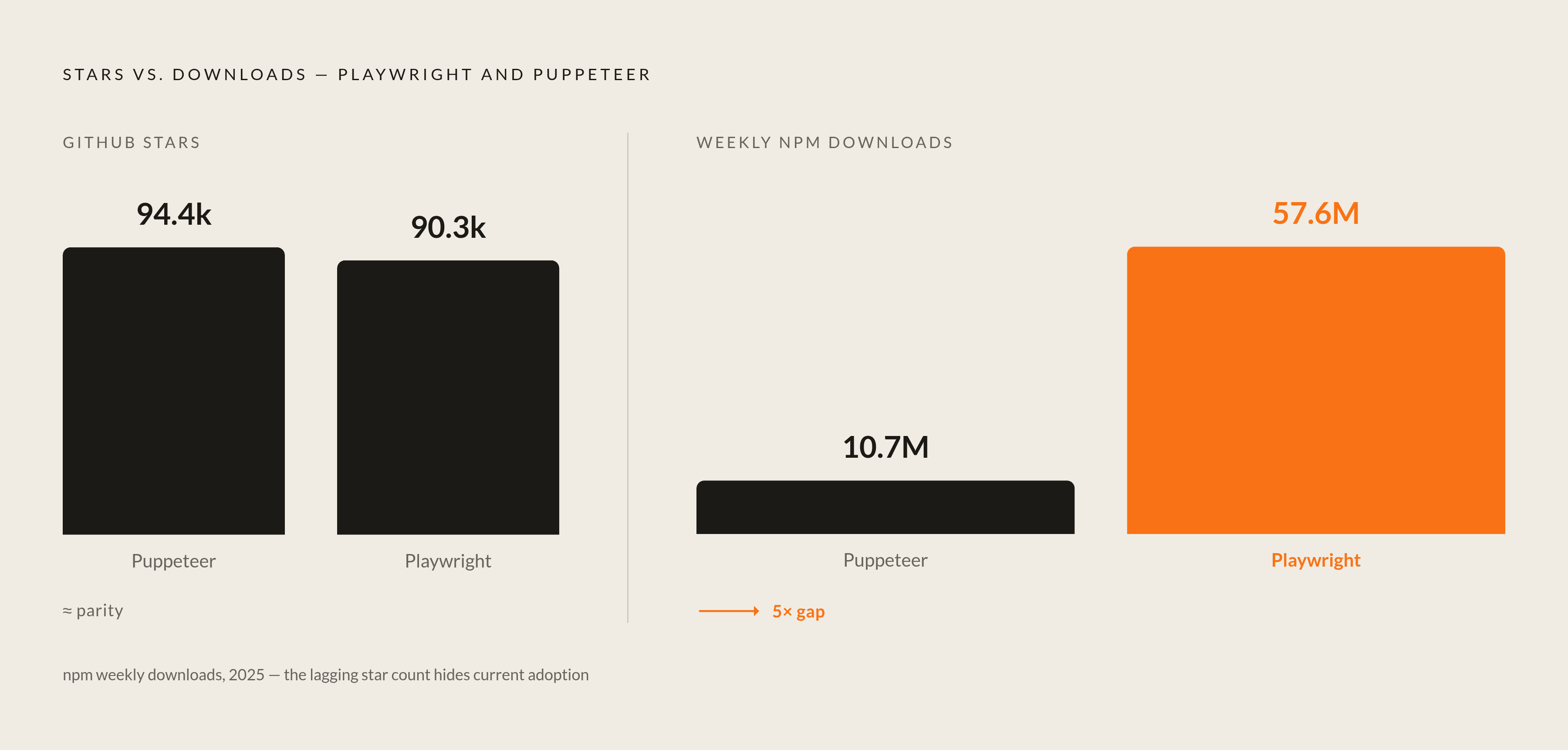
GitHub stars put the two tools in a dead heat, and as of June 2026, Puppeteer sits at 94,423 stars, Playwright at 90,292. If you stopped there, you'd call it a coin flip, but weekly npm downloads tell a different story.
Weekly npm downloads reveal where the actual usage is happening: Playwright pulls roughly 57.6 million downloads a week, Puppeteer about 10.7 million. That's a five-to-one gap, and it's the kind of number that makes stars look like a lagging indicator, a reading of decisions made years ago rather than what teams are shipping today.
State of JS 2024 backs this up from a different angle. Playwright's retention rate, meaning the share of people who used it and said they'd use it again, hit 94%. Usage share jumped from 9% to 15% in a single year, which is not a small move for a testing tool with an established competitor already in the room. TestGuild's 2026 survey of more than 40,000 testers put Playwright at roughly 45% adoption among QA professionals, ahead of Selenium at 22% and Cypress around 14%.
The enterprise signal matters too, if only because it's the kind of thing that's hard to fake: over 12,000 companies run Playwright in production, including Amazon, Microsoft, Apple, NVIDIA, and Walmart. None of these companies pick tools because the logo looked nice in a slide deck.
Worth saying plainly: Puppeteer is actively maintained, still widely deployed, and nobody's ripping it out of working pipelines on principle. What's shifted is where new projects go. Since 2024, net-new automation work has leaned hard toward Playwright, and the job market backs that up: Playwright's share of UK automation job postings went from 0.62% to 1.73% in two years. Search "QA Automation Playwright" on Indeed and you get roughly 10,200 results, versus roughly 8,800 for "Automation Testing Selenium." Puppeteer isn't even the primary comparison point anymore in a lot of these listings, which itself tells you something.
The architectural choices that separate the two tools in day-to-day use
Browser support is the cleanest place to start, because it's the least ambiguous. Playwright talks to Chromium, Firefox, and WebKit, all through one API, and that WebKit build is a special Linux port the Playwright team maintains themselves, which means you get Safari-like behavior in a CI container without owning a single Mac. Puppeteer covers Chrome and Chromium, with experimental Firefox support via WebDriver BiDi, and no path to WebKit or Safari at all.
Why does this matter beyond checkbox completeness? Safari runs on roughly 18% of desktop browsing and accounts for something like half of all US mobile browsing. If your product ships to the public web, ignoring Safari means leaving a meaningful share of real-world traffic untested.
The locator model is the part that took me longer to appreciate, and it's the difference that actually shows up in flaky-test post-mortems. Puppeteer gives you element handles: direct references to a DOM node at the moment you grabbed it. If the page re-renders (and in React, Vue, or Svelte apps, it re-renders constantly, often for reasons that have nothing to do with your test), that handle can go stale, and you click on something that's technically still "there" in your handle but has already been swapped out underneath it. Playwright's locators work differently: they're descriptions of how to find an element, re-evaluated fresh every single time you interact with them. That re-evaluation is what survives a page rearranging itself mid-test, which a fixed handle cannot do.
Auto-waiting follows the same philosophy. Before Playwright executes a click, it runs a set of actionability checks: the element has to be attached, visible, stable, enabled, and able to actually receive the event. Puppeteer expects you to write explicit waitForSelector calls yourself, and it is astonishingly easy to forget one, especially on a site loading content asynchronously. That missing wait call is one of the most common root causes I've seen in flaky scraper reports, and it comes down to a gap between what the tool assumes you'll do and what actually gets done at 4 PM on a Friday deploy.
Language support tells a similar story: Playwright ships with full feature parity across JavaScript/TypeScript, Python, Java, and.NET, while Puppeteer is JavaScript and TypeScript only. There's an unofficial Python port, Pyppeteer, but it's unmaintained at this point and its own documentation points people toward Playwright, which is a fairly unambiguous signal from a project about its own future.
And then there's the test runner question. Playwright ships one, complete with parallel execution, sharding, fixtures, retries, a trace viewer, an HTML reporter, codegen, and a UI mode for watching tests run. Puppeteer has none of that; you're wiring your own with Jest or Mocha or whatever your team already trusts. For a one-off scraping script, this doesn't matter in the slightest. For a test suite that's grown from 20 tests to 2,000, it represents months of internal tooling that somebody, somewhere, is quietly maintaining instead of writing new tests.
What benchmarks actually show about speed and reliability at scale
The benchmark story has a twist that's worth sitting with before drawing conclusions: simple scripts favor Puppeteer, complex flows favor Playwright, and production workloads are almost always the latter.
On a simple login flow, benchmarked by Checkly against a Vue.js demo app, Puppeteer ran nearly 30% faster and showed less variation run to run. That's a real advantage, not a rounding error. Run the same comparison on a complex end-to-end flow (login, configure settings, save, delete), though, and the gap effectively disappears, with Playwright actually coming out slightly ahead and showing marginally lower variability to boot. Across 1,000 test runs, Playwright averaged 4.513 seconds per execution against Puppeteer's 4.784 seconds. That's a 0.271-second difference per test, which sounds trivial until you multiply it across a CI suite running hundreds of tests on every commit. Small numbers compound.
Cold starts flip the script slightly: Puppeteer launches Chrome roughly 5 to 10% faster on a clean machine, which matters if you're doing serverless invocations where every millisecond of cold start is billed and felt. It matters a lot less for a sustained test suite that's already warm. On short, single-page Chrome scripts generally, Puppeteer's lower abstraction overhead can make it 20 to 30% faster, a genuine edge for trivial automation jobs that don't need much beyond "go to page, click thing, screenshot."
Where Playwright pulls ahead structurally is parallelism. It supports up to 100 parallel browser contexts running simultaneously, out of the box, while Puppeteer can approach that only with custom worker-thread implementations that your team has to build and then maintain. Worth noting for anyone benchmarking the wider field: Playwright runs 42% faster than Selenium, a gap driven by its WebSocket protocol and context isolation model rather than any browser-restart overhead, which tells you the architectural choices here aren't incidental. They're the whole point.
On flakiness, State of JS data shows Playwright usage grew 67% year-over-year between 2023 and 2024, which is directionally telling given how much of Puppeteer's flakiness traces back to its manual-wait model. The bottom line: if raw Chrome speed on simple scripts is your bottleneck, Puppeteer wins. If CI throughput and reliability on real-world, multi-step flows is your bottleneck, Playwright wins on both axes at once.
Playwright's retention rate, meaning the share of people who used it and said they'd use it again, hit 94%.
Where Playwright holds the production advantage and where Puppeteer still earns its place
Playwright's clearest wins cluster around a few recognizable shapes of work. Cross-browser end-to-end suites that need Safari coverage, obviously. Modern single-page apps built in React, Vue, or Svelte, where the locator model quietly prevents an entire category of intermittent failures that would otherwise eat someone's Tuesday. Multi-language teams, where a Python backend engineer and a TypeScript frontend engineer need to contribute to the same automation codebase without one of them learning a second language just to write a test. Large parallel CI pipelines that need sharding, retries, and reporting without a team building that scaffolding by hand. And teams adopting AI-assisted development workflows, which gets its own section next, because it's grown into a decision factor on its own.
Puppeteer, though, still earns its keep in specific corners, and it would be dishonest to pretend otherwise. PDF generation is the strongest one: page.pdf() is a mature, well-understood API for rendering HTML to PDF through headless Chrome, and there are years of accumulated production tooling built around it. Playwright's own PDF support is currently Chromium-only, so this gap is narrowing, but for teams already deep in a Chromium-only pipeline, Puppeteer's PDF story is proven and simple.
Quick, one-off Chrome automation is the other honest strength: form submissions, screenshot jobs, basic navigation scripts. Puppeteer's narrower API surface gets you to a working script faster than Playwright's broader one, precisely because there's less to learn before you write your first line. If you're sitting on an existing Puppeteer codebase that runs reliably against Chromium-only targets, the migration cost of switching is a real cost, not a hypothetical one. Nobody should rewrite a working pipeline for architectural purity alone.
Scraping pipelines with accumulated puppeteer-extra tooling deserve a mention here too. puppeteer-extra-plugin-stealth remains the most-cited fingerprint-masking tool in production scraping setups, and teams with that tooling already wired in have real switching costs to weigh. That said, bot detection avoidance used to be cited as a clean Puppeteer advantage, and that's softened: playwright-extra now ships equivalent stealth plugins, so the gap here has effectively closed for most scraping scenarios.
The decision heuristic, if you want the short version: Chromium-only, simple scripts, or an existing Puppeteer investment points toward Puppeteer. Cross-browser needs, parallel CI, multi-language teams, or a greenfield project points toward Playwright.
How Playwright's MCP integration changes the calculus for teams using AI tooling
This is the section that didn't exist as a decision factor two years ago, and now it kind of has to be one. Playwright MCP launched in March 2025, and Playwright Agents followed in October 2025, together turning Playwright into a structured execution layer that AI systems can drive directly.
Here's how it actually works, mechanically: MCP exposes more than 20 discrete tool capabilities, things like browserclick, browsernavigate, browser_snapshot, that an AI model can invoke inside tightly scoped constraints. It operates on the accessibility tree rather than screenshots, which means the model doesn't need vision capability to use it at all. It's also deterministic and fast, and because the tool surface is fixed rather than open-ended, it significantly cuts down on the kind of action-level hallucination you get from free-form AI browser control, where the model has to guess at coordinates or improvise a plan on the fly.
An ecosystem has grown up around this fairly quickly. TestDino does flaky test detection, ZeroStep handles natural-language test execution, and Bug0 generates tests from plain English using Gemini 2.5 Pro. Octomind runs autonomous test flows, AgentQL builds natural language selectors, and Auto Playwright is an open-source project built around a single auto() function that lets you describe an action in a sentence instead of writing selector code. None of these existed as a coherent category before MCP gave them a common protocol to build against.
GitHub Copilot's Coding Agent ships with Playwright MCP built in, which means teams already using Copilot get this integration without lifting a finger to set it up, while Puppeteer has no equivalent ecosystem right now. Teams choosing Puppeteer for AI-augmented automation workflows are, more or less, starting from a blank page. That's a gap in how the surrounding tooling has formed, and it happens to be the fastest-moving part of this whole comparison. Anyone evaluating these tools today should put the agentic tooling question right next to browser support and parallelism on the checklist, not as an afterthought at the bottom.
Making the call: matching tool to workload rather than picking a winner
Both tools share the same DNA, literally: the team that built Puppeteer at Google is largely the same team that moved to Microsoft and built Playwright. That shared origin is actually the most useful lens for reading the differences, because the divergence traces back to which tradeoffs each team chose to prioritize once they got a second shot at the same problem, rather than one team understanding browsers better than the other.
Playwright is the stronger default for production automation heading into 2026. Broader browser coverage, less flakiness at scale, built-in parallelism, multi-language support, and a fast-growing AI tooling ecosystem are the kind of advantages that compound quietly over months rather than announcing themselves on day one. Puppeteer remains the right call in specific, well-bounded conditions: Chrome-only PDF pipelines, trivial single-browser scripts, or teams sitting on mature Puppeteer infrastructure that isn't broken and doesn't need fixing.
The maintenance question is really where this lands, if you zoom out. Playwright's integrated tooling, the test runner, the reporting, the parallelism, reduces how much custom scaffolding a team has to build and then babysit over time. Puppeteer's simpler surface costs less upfront but tends to accumulate assembly cost as a suite grows in complexity, much like a small setup that works fine until it has to support more than it was built for. For teams that want to spend their time writing automation instead of maintaining the infrastructure that runs it, the logic here isn't that different from any build-versus-buy decision: pick the tool that keeps people working on the problem, not on the plumbing underneath it.
The real question is which tool matches the shape of your workload today, and where that workload is headed. Those are different questions, and worth answering separately before you write a single line of test code.
Sources
- https://www.browserstack.com/guide/playwright-vs-puppeteer
Provided GitHub star counts, weekly npm download figures, and the actionability checks detail for Playwright.
- https://www.skyvern.com/blog/puppeteer-vs-playwright-complete-performance-comparison-2025/
Provided the benchmark figures comparing execution times across 1,000 test runs and the cold-start and single-page speed comparisons.
- https://bug0.com/knowledge-base/playwright-vs-puppeteer
Cited as the source for Bug0's AI-powered test generation from plain English using Gemini 2.5 Pro.
- https://autify.com/blog/playwright-vs-puppeteer
Provided the State of JS 2024 retention rate and usage share growth figures for Playwright.
- https://www.proxyhorizon.com/blog/playwright-vs-puppeteer-scraping
Cited as the reference for puppeteer-extra-plugin-stealth as the leading fingerprint-masking tool in production scraping setups.