Browser Automation Testing in CI/CD Pipelines
Skipping browser automation testing means shipping fast until a broken feature reaches real users.
Browser automation testing in CI/CD means running scripted browser interactions, clicks, form fills, page loads, on every code change before a human ever looks at the result. Get it right and you ship fast without breaking things. Get it wrong and your pipeline becomes an expensive machine for generating false alarms.
Enterprise CI/CD adoption crossed a real line a while back. Over 86% of enterprise dev teams now run at least one CI or CD platform, and mature-pipeline teams deploy roughly 200 times more often than laggards while recovering from incidents about 24 times faster. That's the part everyone puts in the pitch deck. What gets left out: only 26% of teams, per GitLab's Global DevSecOps Report, actually enforce automated quality gates that block a bad deploy. Everybody wants the speed. Fewer people build the brakes.
That gap between "automated" and "actually checked" is where browser testing lives. It's the last checkpoint before a broken button or a silently failing checkout flow reaches a real customer. Skip it, or bolt it on as an afterthought, and you get slow, flaky builds nobody trusts. Build it on purpose, and it's the thing that lets you ship faster without crossing your fingers.
What browser automation testing in CI/CD actually involves before choosing any tool
Browser automation means simulating what a real user does: clicking buttons, filling in forms, moving between pages, checking that the right thing shows up on screen, against a running version of your app in a controlled environment. In CI/CD, nobody kicks this off manually before lunch. It fires automatically off a push, a pull request, or a deployment, whether a person is watching or not.
A handful of questions need answers before you even open a framework comparison. Which tool actually runs the tests. Headless or a visible browser window. How the environment gets containerized so it behaves the same on every machine. Where in the pipeline the tests sit. How the workload splits across machines so it doesn't eat your whole afternoon.
Headless mode, no visible window, no display server, wins by default in CI because it runs on any bare Linux container and it's faster. Nobody needs to see the browser blink to know a login form works.
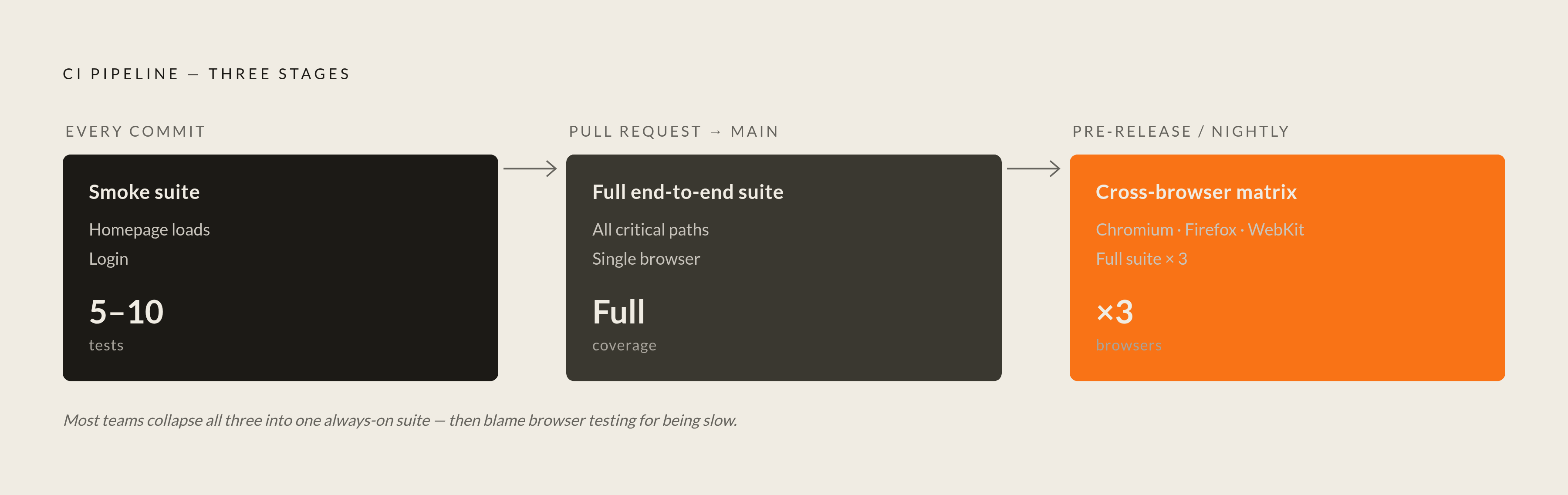
Not every test belongs at every stage either. A five-minute smoke test, homepage loads, login works, should run on every commit. A full end-to-end suite covering every user flow belongs on pull requests, once code is actually up for review. Cross-browser regression, the same flow checked in Chromium, Firefox, and WebKit, costs enough time and compute that it usually runs pre-release or as a nightly job instead.
One more distinction worth nailing down early: the pipeline tool (GitHub Actions, Jenkins, GitLab CI) and the test framework (Playwright, Cypress, Selenium) are two different layers doing two different jobs. Teams mix these up constantly, and it wastes real debugging time when something breaks. One runs your pipeline. The other runs your automation. Keep the two straight and half your headaches go away on their own.
How the three dominant frameworks — Playwright, Cypress, and Selenium — differ in ways that matter for CI/CD
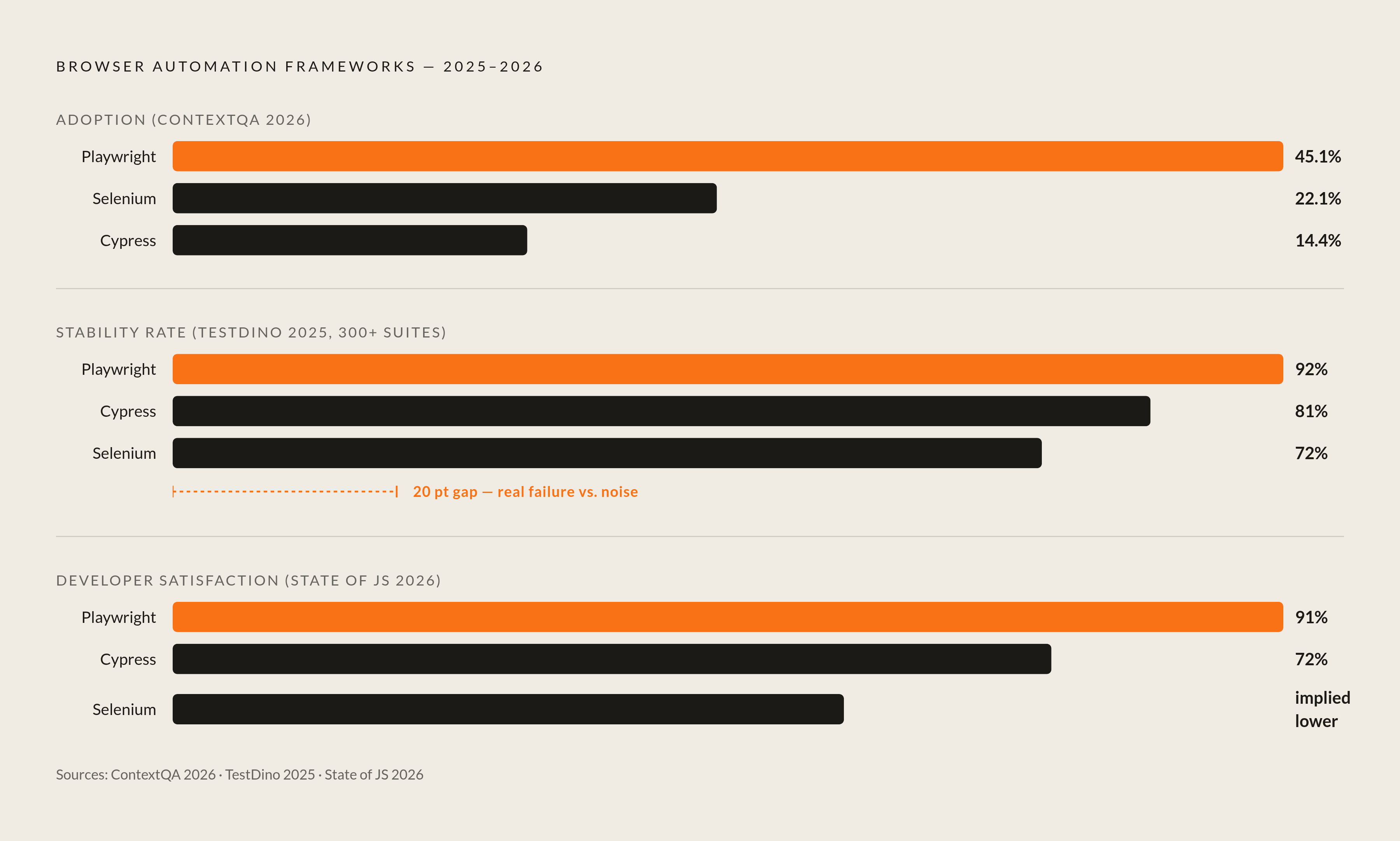
The market has moved, and the reasons show up in CI logs, not blog posts. Per 2026 ContextQA benchmark data, Playwright now leads adoption at 45.1%, Selenium has fallen to 22.1%, and Cypress holds at 14.4%. That shift traces back to architecture, not marketing.
Playwright talks to the browser directly through the Chrome DevTools Protocol (and Firefox and WebKit's equivalents), which cuts out a middleman layer Selenium still depends on. That's a big reason Selenium tends to run slower and flakier. Cypress does something different again, running inside the browser process itself. You get excellent front-end debugging out of that, you can practically watch the test think, but Cypress still struggles with multi-tab flows and cross-origin scenarios the other two handle fine.
Stability is where this stops being architecture trivia. TestDino's 2025 analysis of over 300 test suites found Playwright at a 92% stability rate, Cypress at 81%, Selenium at 72%. In CI, that 20-point gap between Playwright and Selenium decides whether a red build means "something broke" or "run it again and see what happens this time."
Parallelization follows the same split. Playwright ships with test sharding built in, free, no extra setup. Cypress needs Cypress Cloud, a paid product, to spread tests across CI workers. Selenium needs a Selenium Grid configured by hand. Cross-browser coverage tracks the pattern too: Playwright hits Chromium, Firefox, and WebKit from one API, Cypress bolted on WebKit later and still calls it experimental, and Selenium covers the widest browser matrix of the three in exchange for more setup work.
None of this retires Selenium, and writing its obituary would be premature. Over 31,000 companies still report using it in 2025, mostly running legacy enterprise stacks built on the WebDriver standard, where rewriting years of test infrastructure costs more than any speed gain would pay back. The January 2026 State of JS survey shows the same gap in developer sentiment: 91% satisfaction for Playwright against 72% for Cypress, the widest spread that survey has ever recorded. And yet 74.6% of QA teams run two or more frameworks side by side, which says something the adoption numbers alone don't: the honest answer to "which one should we use" is usually "depends which part of the app," not a single name on a whiteboard.
Teams doing heavy React or Vue component testing still reach for Cypress, and for good reason. Teams locked into WebDriver infrastructure, or facing legal restrictions on tooling, still have a real case for Selenium. Call it a shift in the numbers, not a rout on the ground.
Choosing the right CI/CD orchestration platform and what each means for browser test integration
The 2025 JetBrains State of CI/CD survey puts GitHub Actions at 33% organizational adoption, Between the three, that covers most of what teams are actually picking from. And the choice rarely sticks: a notable share of organizations run two CI/CD tools at once, usually mid-migration, and the migration has a habit of never quite finishing.
GitHub Actions comes with marketplace actions for Playwright, Cypress, and Selenium already built, and its Ubuntu runners ship with Chromium preinstalled, so headless tests run with close to zero setup. Matrix builds turn cross-browser testing into a few lines of YAML instead of a project plan. It's the default pick for teams already living on GitHub, and it dominates open source for that exact reason.
GitLab CI treats Docker containers as the native execution unit rather than a bolt-on, which lines up naturally with how headless browser tests want to run anyway. It's also the platform showing strong enterprise growth in 2025, and its built-in test reporting puts browser test results directly inside merge requests, no separate dashboard to check.
Jenkins remains the backbone of CI/CD at most Fortune 500 companies, and inertia is only part of the story; compliance is the bigger one. On-premise deployment is Jenkins's real edge: regulated industries, financial services, healthcare, government, defense, often run air-gapped environments where a cloud-hosted runner isn't an option, compliant or otherwise. Jenkins is frequently the only tool in the room that clears legal review. It's losing ground among brand-new projects, sure, but ripping it out of an existing enterprise stack is its own multi-quarter project, so it isn't going anywhere soon. Browser testing on Jenkins does take more manual labor: installing browsers on agents, tracking driver versions, wiring up display servers or Docker agents by hand.
The platform choice ripples into things that look unrelated at first: how secrets get managed, how containers get orchestrated, where screenshots and video artifacts get stored. All of it eventually touches browser testing directly.
It's the last checkpoint before a broken button or a silently failing checkout flow reaches a real customer.
Containerizing browser test environments to eliminate "works on my machine" failures
Containerized pipelines have become the dominant pattern in CI/CD. Containers stopped being the advanced move a while back. They're the floor now, not the ceiling.
The specific problem containers solve is a familiar one: a test fails in CI but passes locally, and it turns out to have nothing to do with the test code. Different OS, a browser two patches ahead, a missing font, a display server quirk. None of that shows up in a code review. All of it shows up in a red build.
Playwright ships official Docker images with all three browser binaries, Chromium, Firefox, WebKit, preinstalled with dependencies already resolved. Use those instead of building a custom image from scratch; there's no prize for reinventing that wheel. Inside a Linux container, Chrome specifically needs the flags --no-sandbox and --disable-dev-shm-usage, required because of how Linux namespaces restrict sandboxing inside containers. Skip those two flags and you've found one of the most common, and most mysterious-looking, sources of CI-only failures. Mount test artifacts, screenshots, traces, videos, as Docker volumes so they survive after the container shuts down, because otherwise your evidence disappears right when you need it most. Pin the browser binary version in the image itself too, so an upstream update doesn't quietly change your results overnight.
At bigger scale, Kubernetes becomes the relevant layer, now widely adopted across enterprise production environments. It lets you run many test containers in parallel across shared infrastructure, which starts to matter once your suite is big enough that running it sequentially eats your whole afternoon. Playwright's browser context isolation adds a further efficiency here, since multiple isolated contexts can share one browser process. Selenium Grid, by contrast, spawns a full separate browser process per test, which costs more memory and CPU for the same coverage.
The goal across all of this is parity: the same container image running in dev, in CI, and in staging, not three configurations quietly drifting apart while nobody's looking. The most common way teams sabotage their own containerization effort is running tests inside Docker in CI but outside Docker on local machines, which brings back the exact environment drift the containers were supposed to kill.
How to structure browser tests within a pipeline so they speed up releases instead of blocking them
Running the whole browser test suite on every commit is the single most common reason browser testing gets blamed for slowing everything down. It's also a completely self-inflicted wound.
The fix is structural, not clever. Fast unit and integration tests run first, and a 45-minute end-to-end suite should never be what stands between a developer and their next commit. A small smoke suite, five to ten tests covering the paths that would actually be embarrassing to break, runs on every push for fast feedback. The full end-to-end suite runs on pull requests targeting main, once code is a real merge candidate. Cross-browser matrix testing, the expensive and thorough kind, runs pre-release or overnight where the extra time doesn't block anyone.
Parallelization is the biggest lever here, full stop. Playwright's native sharding splits a suite of, say, 500 tests across several CI workers instead of running them one after another, and wall-clock time drops fast. Each worker takes a shard, runs its share, results merge in a final step; GitHub Actions and GitLab CI both handle this through their matrix strategy syntax. Teams migrating from Selenium to Playwright have reported substantial CI runtime reductions, with parallelism gains doing most of that work, not any single feature.
Quality gates are the part most teams quietly skip. Only 26% enforce them, per that same GitLab report from the intro. Without a real gate, a browser test suite is just an elaborate reporting tool that tells you something broke after you've already shipped it. The fix is one configuration setting: a failing test should fail the pipeline step outright, not log a warning that scrolls past unread.
On failure, grab screenshots, video, and Playwright's trace files automatically. Skip that and debugging a CI-only failure turns into guessing instead of investigating. Keep the artifacts around long enough to matter if a related bug shows up in production weeks later. And tag tests by feature area or by how critical they are, so a feature branch can run just the relevant slice instead of the whole suite every time.
The flaky test problem and what actually reduces it in a CI context
Flaky tests have been documented to account for a significant share of CI build failures at large engineering organizations, with the resulting waste measured in hundreds of thousands of developer hours annually. That's not a rounding error. That's a full team's worth of time spent re-running tests instead of writing code.
Industry data consistently shows the share of teams reporting test flakiness has grown meaningfully as pipelines have become more complex and distributed. Pipelines get more complex, more parallel, more distributed, and flakiness doesn't hold still while that happens; it grows right along with it. Some teams burn a real chunk of their CI compute budget purely on retries, which is a workaround, not a cure. Retrying a flaky test just moves the failure to tomorrow.
The causes specific to browser tests cluster around a few patterns. Timing tops the list: a test that passes reliably on a developer's laptop, where waits happen to be long enough, can fail in CI when a faster or more contended machine exposes a race condition that was sitting there the whole time. Rendering differences between headless and headed mode, fonts, animation timing, GPU-accelerated CSS, cause a second cluster. Shared state is a third: a test that writes to a database record or leaves cookies behind without cleanup can quietly poison the test running right after it. Network calls to real external APIs cause a fourth failure mode, since a slow third-party service or a rate limit on your CI provider's IP range has nothing to do with your code but still turns your build red. Underpowered CI workers running too many tests at once round it out with plain resource contention, showing up as timeouts that look like bugs but are really just traffic jams.
The fixes that actually work tend to be boring, which is a compliment here. Framework-native auto-waiting, Playwright waits until an element is genuinely clickable before clicking it, kills most of the manual sleep() calls that used to paper over timing bugs. Giving each test a fresh browser context, instead of sharing cookies or local storage across a run, removes a whole category of contamination. Mocking external API calls, through Playwright's route interception or something equivalent, kills the non-determinism of hoping a third party's server is fast and available on demand. Persistently flaky tests should get tagged and pulled out of the blocking gate rather than held up as hostages while someone investigates on their own schedule. Teams using observability tooling around their test runs saw about 25% fewer flaky reruns, per that same TestDino benchmark, with steadier build success rates over time to show for it.
Framework choice matters here too, and it's worth circling back to. Playwright's 92% stability rate against Selenium's 72%, same TestDino 2025 numbers from earlier, is a real gap, not statistical noise. A team stuck on Selenium and chronically fighting flaky builds owes itself an honest question: is the tool's architecture the problem, or the test code? Sometimes the fix isn't a better test. It's a better foundation for the test to stand on.
Sources
- https://cloudqa.io/qa-automation-in-devops-testing-trends/
Provided the GitLab Global DevSecOps Report statistic that only 26% of teams enforce automated quality gates.