Avoiding CAPTCHAs and Rate Limits in Automated Browsers
Automated browsers leak fingerprints across network layers no script can hide.

I spent a summer once trying to scrape a ticketing site for a research project, and I learned the hard way that "headless" doesn't mean "invisible." It means your browser is holding up a sign that says PLEASE INVESTIGATE ME. This piece is about why that sign is so hard to put down: automated browsers get flagged because they act like machines pretending to be people, and that pretending leaves fingerprints in a dozen places at once, from the JavaScript a page can read down to network-level details no script can touch. Patch one layer and ignore the rest, and you usually make things worse, because a fix in one place can create a new contradiction somewhere else.
Some numbers to set the stage. The 2025 Imperva Bad Bot Report found automated traffic passed human traffic on the web for the first time: automated traffic now accounts for 51% of everything moving across the internet. Malicious bots alone climbed to 37% of all traffic in 2024, up from 32% the year before, the sixth straight year that number has grown. Imperva pulled this figure from 13 trillion bad bot requests it actually blocked across thousands of domains in 2024. Websites treat every request as guilty until proven innocent, scoring a session on dozens of signals before deciding whether it earns a page. Doesn't matter if you're building a scraper for a legitimate research project, a QA testing suite, or an AI agent doing something entirely above-board. The net checks "human or not," and that's it.
The four layers where detection actually happens, ordered by how hard each is to defeat
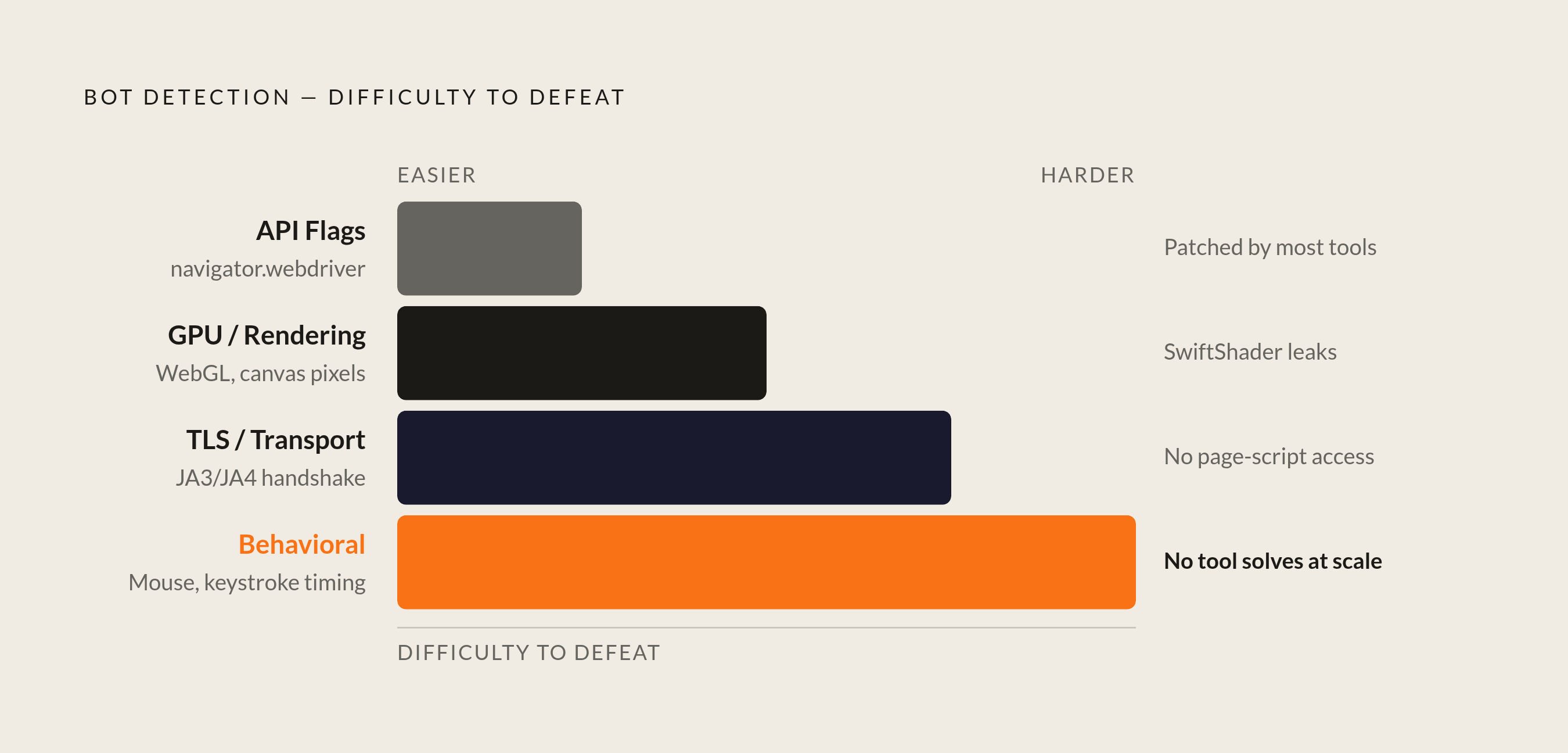
Detection today runs as a stack, four layers deep, and that matters because patching one and calling it a day almost never works.
Layer one is cheap to check and cheap to fix: API-level stuff sitting in the browser's JavaScript environment. navigator.webdriver, plugin lists, whether certain events fire the way a real browser fires them automatically. Layer two lives in rendering: WebGL output, canvas data, GPU vendor strings. Spin up headless Chrome in a cloud VM and it reports a virtual GPU, usually SwiftShader or llvmpipe, and no consumer laptop on the planet has one of those. Layer three is TLS and transport: the handshake happens before a single line of page JavaScript runs, and it includes things like cipher order, TCP window size, HTTP/2 settings frames. None of that is reachable from inside the page; you need a different browser binary, or a proxy that re-originates the handshake itself. Layer four is behavior, read server-side from the raw event stream: how the mouse moves, how long someone pauses before clicking, the rhythm between keystrokes. No API override touches that, because nothing about it lives client-side to begin with.
These layers don't run independently, and a mismatch between them is itself a signal. Picture a session claiming Chrome 120 on Windows while its WebGL renderer reports SwiftShader. That's a contradiction, and no real browser produces that contradiction on its own. You can patch layer one flawlessly and still get caught cold at layer three. That's the entire point of building detection this way.
What navigator.webdriver and other API-level flags actually expose, and the standard patches
navigator.webdriver gets set to true by every Playwright instance, because the W3C WebDriver spec requires it. Anti-bot scripts check it first because it's free to check, and a flag that announces "I am a robot" in plain text isn't exactly subtle.
There's a small pile of other tells beyond that one flag: no chrome.runtime object, screen dimensions that look suspiciously round, missing plugin arrays, event listeners a real Chrome window registers on load that never fire in an automated one. The standard fix is injecting a script before the page's own scripts run, page.addInitScript() in Playwright, that quietly rewrites navigator.webdriver to false and patches the rest down the list. The playwright-stealth project bundles a lot of this into one plugin, handling navigator.webdriver, chrome.runtime, plugin enumeration, language settings, and some WebGL fields, so nobody's hand-writing twenty property overrides from scratch.
Here's the catch, and it's worth staring at directly: every one of these patches lives in JavaScript. They change what a page script can read. They do nothing to the compiled browser binary or the network stack underneath it, which is exactly the problem the next two sections dig into.
Tooling shifts fast here, so a quick note. The older puppeteer-extra-plugin-stealth package got deprecated by its maintainer in February 2025 and hasn't seen an update since. The Python playwright-stealth package, currently at 2.0.2, is the one still getting attention through 2025 and 2026. And Selenium, generally, exposes a wider detection surface than Playwright straight out of the box, so switching frameworks before touching a single stealth plugin is often the bigger win available to you.
How GPU and rendering fingerprints expose headless environments, and the partial fixes available
WebGL is where headless setups give themselves away hardest. Run a browser in a cloud VM with no physical graphics card, and it reports a software renderer, usually Google's SwiftShader or the open-source llvmpipe. Nobody's actual laptop reports that string, ever. It's close to a signed confession, since those software renderers live almost exclusively on servers and virtual machines, never in the hands of someone browsing from their couch.
Canvas fingerprinting rides the same weakness. Headless rendering produces pixel output subtly different from what a GPU-accelerated real browser draws for identical instructions, and that difference is measurable, not theoretical.
Partial fixes exist. Running automation on machines with actual GPU access, bare metal or a cloud instance with GPU passthrough, kills the problem at the source. Injecting noise into canvas output breaks fingerprint consistency across sessions. Stealth plugins will happily rewrite the WebGL vendor and renderer strings to claim an NVIDIA card that doesn't exist. But here's the same catch from the last section wearing a different hat: rewrite the reported string while the underlying renderer is still software, and you've built exactly the cross-signal mismatch detection systems exist to catch. The fingerprint says "real GPU." The pixels being drawn say "headless." No JavaScript patch closes that gap; the gap lives in the machine itself, below anything a script can reach. Running somewhere the fingerprint happens to be true already tends to beat a smarter fake.
TLS and transport fingerprinting: the layer JavaScript cannot touch
None of this layer happens inside the browser tab at all, which is where "stealth mode" runs out of reach.
TLS fingerprinting, done through JA3 or the newer JA4, reads the order a client lists its supported ciphers, which extensions it sends, the shape of the handshake overall. All of that gets decided by the browser binary and the OS network stack before a single page script runs. Cloudflare added JA4 checks in mid-2025 alongside something that digs even deeper: a probe checking whether the Chrome DevTools Protocol's Runtime.enable command got called, a signal sitting below anything a JavaScript patch could reach. HTTP/2 fingerprinting stacks another layer on top, reading header ordering and stream concurrency settings, transmitted before the page even loads.
Net result: a patched Playwright instance running headless on Linux produces a TLS fingerprint matching no real Chrome build on Windows or macOS, no matter what the User-Agent string claims. A browser can lie about its name all day. Lying about its handshake is a different problem entirely.
Three practical workarounds exist, and none of them come free. Route traffic through a proxy that terminates the TLS connection and re-originates it with a fingerprint matching a real browser, though that just relocates the problem onto the proxy provider's infrastructure. Use browser builds patched at the binary level, Patchright or Camoufox, which bake evasions in below the JavaScript layer entirely. Or lean on a managed browser service that handles this at the infrastructure level, so your automation code never has to think about it. How well any of this actually holds up is sobering: benchmarks from cside show raw Playwright sessions getting caught 98.2% of the time, and even stealth-mode sessions from at least one major browserless provider caught 100% of the time, false-positive rate under 1%. That's most of the gap, full stop.
Detection today runs as a stack, four layers deep, and that matters because patching one and calling it a day almost never works.
Why behavioral signals are the layer no current tool reliably solves at scale
Behavioral detection reads the stream of events a browser sends while a person interacts with a page: where the mouse travels, how scrolling speeds up and slows down, gaps between keystrokes, how long someone hovers before clicking. None of it passes through a JavaScript API a script can quietly override. It gets read server-side, off the raw event log, so client-side patching has nothing to grab.
So picture a script that's patched every API-level flag, spoofed its GPU strings, routed through a spotless residential IP, and it still gets caught here, because it fills out a form in twelve milliseconds and drags its cursor in a perfectly straight line from point A to point B. Real human movement has friction. It accelerates, overshoots a little, corrects, slows down near the target. Left alone, automation libraries produce none of that texture.
Mitigations exist, and they help even without closing the gap fully. Randomized delays between actions, shaped to resemble actual reading or decision time rather than flat uniform randomness, is one. Libraries generating curved, slightly jittery mouse paths instead of jumping straight to a coordinate is another. Varying the sequence of actions within a session, instead of clicking the same three elements in the same order every single time, helps too.
Nobody's cracked this one reliably at scale, and that's the honest answer. Every mitigation reduces suspicion; none of them eliminate it against a hardened target like Cloudflare Turnstile. The smarter move, covered next, is usually just not tripping the behavioral alarm in the first place, rather than trying to convincingly fake being human once you're already under the microscope.
Rate limiting as a detection mechanism: what triggers it and how request patterns avoid it
Rate limiting sounds like a volume problem. Modern systems watch velocity, which endpoints get hit, how regular the session's rhythm is, spacing between requests, all independent of raw requests-per-minute.
A few things trip rate limits with zero fingerprinting involved. Requests landing at exactly the same interval every time, precisely every two seconds say, reads as a script, because no human clicks with metronome precision. Hammering the same endpoint repeatedly with identical query parameters and no referrer variation is another tell. So is a session that never idles, never navigates backward, never revisits a page, the way real browsing sessions constantly do. A server also notices what's missing: a real browser loads fonts, tracking pixels, and analytics scripts alongside page content, and a scraper skipping all of that leaves a hole in the request pattern visible without touching a line of JavaScript.
The fixes track pretty directly to the causes here. Randomize the delay between requests using something resembling human reading time, not a flat random number. Spread load across multiple sessions instead of one long marathon session. Load the ancillary stuff a real page load triggers, and occasionally wander down a dead-end path the way a person clicking the wrong link would. Respect robots.txt crawl-delay directives where they exist, since ignoring them reads as hostile intent on plenty of platforms. And when a 429 comes back, back off geometrically instead of retrying immediately; repeated 429s escalate to full IP-level blocks on a lot of platforms, so hammering through just speeds up your own ban.
Worth flagging how these two systems interact. A session sailing through every fingerprint check but keeping a robotic rhythm still gets flagged, just at a different checkpoint down the line. Fingerprinting and rate limiting are catching two entirely different mistakes.
Proxy strategy: IP rotation, residential proxies, and the limits of hiding behind real addresses
IP reputation runs on its own axis, separate from everything above it. Datacenter IP ranges are well documented and get treated as suspicious by default on any hardened target, because legitimate human traffic just doesn't pour out of AWS or Google Cloud address blocks in bulk.
Residential proxies dodge that by routing traffic through ordinary ISP-assigned addresses, the kind belonging to actual home internet connections. But that trick stopped being a secret a while back. The 2025 Imperva Bad Bot Report puts the share of bot attacks using residential proxies at 21%, and that volume has pushed detection systems to scrutinize residential IPs harder than before, not less. The response on the detection side has been cross-referencing IP type against behavior: a residential IP clicking with robotic timing gets flagged the same as a datacenter IP would.
A few rules of thumb help. Rotate IPs at the session level, a new address per logical task rather than per request, because per-request rotation creates its own detectable pattern. Match the proxy's geography to whatever locale the session claims; a browser presenting as an English-language Windows machine routed through an address in Southeast Asia is its own kind of contradiction, same family as the GPU spoofing mismatch from earlier. And for anything multi-step, keep the session sticky on one IP instead of rotating mid-workflow, since platforms tracking session continuity treat a mid-task IP change as a red flag all by itself.
Commercial CAPTCHA-solving operations increasingly rely on residential proxies to blend bot traffic with genuine user activity.cale, which is exactly why detection systems adapted around them in the first place. The technique still matters, but it says nothing about TLS fingerprints, GPU signals, or behavior, all of which get evaluated together rather than in isolation.
The CAPTCHA ecosystem in 2025–2026 and what each major system is actually measuring
Three systems dominate this space, and they measure genuinely different things, which matters more than it sounds like it should.
reCAPTCHA v3 and its Enterprise tier run invisibly, scoring a session from 0.0 to 1.0 based on behavioral history and fingerprint data, no visual puzzle involved at all. A low score just quietly gates the page or kicks off a secondary challenge behind the scenes. Google folded classic reCAPTCHA into Google Cloud during 2025, so Enterprise is now the default path for anyone setting up a new site. Cloudflare Turnstile runs a non-interactive proof-of-work check alongside fingerprint analysis in the background, and by 2026 it ships with a "Block AI Scrapers" toggle that names specific crawlers (GPTBot, ClaudeBot, PerplexityBot) and challenges them directly. CAPTCHAs increasingly target named AI agents specifically, alongside bots in general. hCAPTCHA sits in similar territory, competing with Turnstile mostly at the enterprise level, leaning on catch rate over user friction.
So what does this mean if you're trying to get past any of it? For v3 and Enterprise, there's nothing to "solve" in the traditional sense, since the risk score gets calculated from everything that happened before the challenge ever appears on screen. By the time a CAPTCHA shows up, the decision's mostly already made. Turnstile's non-interactive design closes off the classic workaround too: no puzzle for a human solver to look at and click through, because the whole check runs silently inside the browser's own context. The goal has shifted from solving a challenge to never triggering one in the first place.
CAPTCHA solving services: what they cost, what they can handle, and where they break down
CAPTCHA-solving services still exist and still get used, mostly for the visual, interactive puzzles: image grids, distorted text, the "click all the traffic lights" routine. Pricing generally runs per thousand solves, with services offering computer-vision solving, human workers clicking through puzzles in real time, or some blend of both depending on difficulty. For a straightforward image challenge, that model still works reasonably well, and accuracy on the easier challenge types sits fairly high in vendor-reported numbers.
Where it falls apart is exactly where the rest of this piece has been pointing the whole time. A human solver clicking through a visual puzzle does nothing about the TLS fingerprint sitting underneath the session. Does nothing about the GPU string the browser reports. Does nothing about the robotic click pattern that got the session flagged for a challenge in the first place. Solving the puzzle is table stakes now, not the finish line. And against Turnstile's non-interactive design, or a v3 Enterprise score computed before any challenge even renders, there's no puzzle to hand off to a solver, human or automated. The service has nothing left to click.
That's the thread running under all four layers, really. A stealth plugin patching navigator.webdriver, a proxy provider selling residential IPs, a solving service with human workers on standby: each one addresses a single layer of a four-layer stack, and detection systems have gotten good at checking all four at once, in the same pass. Fixing one layer while the other three keep signaling automation doesn't buy safety. It just buys a pricier way to get caught.
Sources
- https://www.imperva.com/resources/resource-library/reports/2025-bad-bot-report/
Provided the statistic that automated traffic accounts for 51% of all internet traffic.
- https://cpl.thalesgroup.com/blog/access-management/ai-bots-internet-traffic-imperva-2025-report
Provided the figure that 21% of bot attacks use residential proxies, cited in the proxy strategy section.
- https://www.imperva.com/blog/2025-imperva-bad-bot-report-how-ai-is-supercharging-the-bot-threat/
Provided the statistics on malicious bot traffic share (37% in 2024, up from 32%) and the 13 trillion blocked bad bot requests.