Browser Automation Output Validation and Data Quality Checks
Catches errors in automated data extraction before they multiply downstream into unusable records.

Downstream, Browser automation output validation shows if a scraped or agent-generated dataset is reliable. Correctness and speed differ, and most failures in the pipeline sit right in that space between the two. Groups that use browser automation right reduce test cycles between 40 to 60% plus hand work by about 70%, World Quality Report 2024-2025 says, but those figures show throughput rather than accuracy. When a pipeline runs quickly but produces wrong data, you just get more of it, reaching a volume no one could catch alone.
Automation won’t get bad data out. Since no one is slowing down to check, it multiplies the bad data that slips past.
Browser agents driven by AI only make the problem grow. Every scripted test takes the same route per run. The agent makes choices from what is on screen, and those choices can shift between each run while the screen stays exactly the same. Run one agent on one task a second time and it might follow two different routes to one result, or give you two different outputs when the work just looks the same. Old automation didn’t face that failure mode, while most groups still validate like it isn’t real.
Self-healing agents bring a new wrinkle. They can adapt by themselves when a layout shifts, so the usual failure (code failing because the class name was altered) largely disappears. Oversight isn't reduced by this, though. Oversight still matters, but it shifts: rather than patching selectors, people use their hours to confirm the data they got is correct. Instead of shrinking, the human work shifts form; when treating it as optional, a pipeline looks fine on stage, then may quietly break in live use, handing a group figures no one checked until a downstream report fails to tally.
The eight dimensions of output quality that validation needs to cover
You can't check Data quality as a single thing. Data quality can be assessed across eight dimensions: accuracy, completeness, consistency, volumetrics, timing, conformity, precision, and coverage. Each dimension lines up with a recognizable failure mode in a browser automation pipeline, yet most groups write checks covering only one or two, usually the ones easiest to spot.
Accuracy failures can be like some price field returning any placeholder value, or one status field with stale content because the screen was still updating. Completeness failures usually surface as nulls, often because the element was still rendering when the agent went to read it. Consistency breaks if one field shows up using different formats between attempts, like dates stored as strings once then integers later, a frequent hidden issue with data that's scraped.
Volumetrics find the worst failures: record counts dropping fast after the pipeline hit some CAPTCHA, bot-detection block, or layout change that agent couldn't handle. Timeliness catches data showing up past the deadline, even if otherwise fine. Conformity flags values outside set formats, phone fields lacking country dialing codes, URLs with no protocol prefix. Precision is the subtle one. Even a correct value might help nobody, say when a timestamp rounded down to the date doesn't fit your case. The quiet one catches skips nobody sees in the first place: pages this pipeline couldn't reach because of pagination errors, auth barriers, or stops our agent didn't report.
Groups usually get this wrong: domain experts must write the business logic covering cross-field checks and accuracy, whereas freshness along with volumetrics call for monitoring that tracks patterns over months. Mix up these two roles and the group winds up running checks only on the clearly broken column, leaving whole failure classes hidden until something downstream breaks with no clear cause.
Structural checks: schema validation and data type enforcement as the first line of defense
Schema validation and data type enforcement serve as the first line of defense, stopping errors before they spread downstream. This first check needs to be firm. Nothing justifies loosening it even slightly.
Running a browser with automation, structural checks make sure of a few simple things. Every data record carries the standard fields; if one comes up empty, the extraction logic probably failed to grab the right element. If a numeric Field keeps returning one string, then the schema expects another format, so your selector picked the wrong element or the site rendered some error. String lengths and value limits keep to sane bounds: a name with zero text, while a price field returning some multi-thousand-character blob, both show extraction has gone wrong. If a status field is returning a value the Enum didn't list, that means the agent read an unaccounted-for UI state.
Shift-left applies at this stage, too. Run validation checks right after extraction, before data reaches the downstream store, stopping a bad record from propagating. Groups can set up a schema contract using tools like Great Expectations, dbt, deequ, and Soda, then enforce it each run. The easiest layer to automate in full is this one; treating it like a nice-to-have bolted on at the end is wrong, not a shortcut. Make it non-negotiable.
Logical and cross-field validation: catching errors that pass structural checks
Certain errors clear structural checks entirely since each field looks fine by itself. That's why Qualytics uses the term cross-field validation: comparing fields shows that error.
A marked-down price above the regular price is the usual case. Each value clears its own range check, yet as a pair the two logically conflict. Both fields clear completeness checks when an item shows "in stock" alongside zero count, but together they signal some rendering inconsistency or something stuck mid-update. An occasion whose finish comes before its beginning holds two timestamps and, combined, they suggest the agent grabbed the wrong fields. A fee set at zero for a purchase flagged as "express delivery" looks plausible by itself but odd beside the other field.
Referential and constraint checks belong in this layer too: confirming that extracted IDs appear in the right lists, that links between data sets stay valid, that a subcategory fits its parent as expected. Adding business details makes Range checks trickier. One penny for a scraped price might clear one numeric range check, yet flagging that possible placeholder requires a business rule from someone familiar with the domain. At this layer, data staff and business experts must meet face to face. They can’t build these by themselves; pretending otherwise simply means many checks get skipped.
Volumetric and freshness monitoring: detecting pipeline failures before downstream consumers do
Per Qualytics, freshness and record counts spot pipeline failures earlier than anyone downstream notices stale data. When a record never appears, that layer catches issues a field-level check can't spot.
When the record total falls between checks, that usually means your pipeline hit a structural problem, like CAPTCHA, bot-detection barrier, login gate, or a restructure your agent didn't manage gracefully. A spike in the opposite direction suggests duplication, pagination that repeats itself, or an agent traversing too many pages. A run with zero records is the worst case, yet many pipelines haven't bothered adding an explicit check from the first place, so this failure rarely sets off an alert.
Freshness follows the same logic. Decide a staleness limit for each output dataset early on, so the alert fires when no successful run happens within it, and nobody goes searching for missing data. But what counts as "normal" volume shifts by day of week, time of day, and the quirks of whatever site is being scraped. The flat threshold alert fires again and again on shifts that are routine, a failure mode in itself. Don't bother with a flat threshold. ML-based detection of anomalies, as in tools like Anomalo and Monte Carlo, learns the real baseline and flags only deviations that are truly odd, not plain Tuesday.
The agent makes choices from what is on screen, and those choices can shift between each run while the screen stays exactly the same.
Rule-based and AI-based validation: how to combine both approaches in practice
Two methods now lead automated data quality efforts. Rule-based automation checks data for compliance with criteria defined ahead of time. AI-based automation finds anomalies with models, and can even create checks before anyone writes a first explicit rule. Choosing just one saves nothing: most companies run the two together, since what one method misses, the other often catches.
Rule-based checks work best when your logic stays steady. A schema contract defines which values are permitted, a required field must never be null, and no price goes negative. Keeping regulators happy leans on these checks too, because whatever carries legal force must be auditable and explicit rather than inferred by software.
AI-based checks bring value where fixed logic falls short. Anomaly detection flags statistically odd values that slip past any defined rule anyway, since no rule was made to spot them. These tools can analyze past data to help identify potential quality checks. AI-based monitoring can detect anomalies that fixed rules might miss, including gradual shifts in site patterns.
One wrinkle around oversight needs naming right now. Frameworks in law may require that AI-generated validation calls undergo audits, and the standard climbs as regulatory frameworks may require that AI-generated validation calls undergo audits. Apply rule-based checks to each known constraint first, and layer on top AI-based anomaly detection for the rest. See every rule from AI as a proposal someone checks before it reaches live use, period. Atlan says Great Expectations, Soda, Monte Carlo, Anomalo, deequ alongside dbt handle most of these tasks together, while Databricks and Snowflake each offer built-in data quality tools.
Self-healing agents and result validation: where browser automation and data quality intersect most directly
Behaviorally, here is what separates an AI browser agent from a scripted test: when a button's CSS class name shifts, Playwright breaks, yet the agent looks at that element, recognizes its label still reads "Submit," then clicks it regardless. Agents read what’s shown in the browser rather than using a fixed selector string, as this research brief says.
Tools such as Kadoa handle Self-healing by matching data from an earlier run to the latest one. If the layout changes, the agent adapts, sometimes adjusting extraction logic without immediate human intervention, yet Kadoa's operations team may still get pulled in on cases when an agent fails to self-heal alone, according to Kadoa's documentation for 2026. Result validation should stand on its own, not skipped as something to handle later. Once the task finishes, validation runs checks and gives structured data. That isn't where extraction happens. This check works entirely differently, looking for other failure modes.
Self-healing solves layout issues. But conflating those two remains the error people run into most here. The agent can read the value in a correct element after the site layout shifts, but the value may remain wrong when its page's text is wrong. Self-healing also has nothing to do with business logic, because no agent is born with a feel for which values fit a domain. The sharpest danger is failure without warning: when the agent adapts during a layout change, quietly mapping onto some different element, then extraction succeeds structurally but data turns out categorically wrong, so that run looks fine.
Cloud-managed browser platforms (including Steel, Browserbase, and Firecrawl's Browser Sandbox) handle the scaling of browser automation, though output validation remains a separate layer organizations must implement Organizations still have to create their validation layer, whatever setup they use. Retry logic is worth its own note: retrying one that broke, while confirming whether a successful one gave correct output, counts as two different things, so the pipeline must have both, not one covering for the other.
Human-in-the-loop checkpoints: where automation reaches its limit and judgment takes over
AI scrapers may hit solid accuracy across structured pages, but even tiny error levels create many wrong items as volume grows. No rule alone can settle if one cent, as a scraped price, reflects a real steal, an error in the data, or a value left as a placeholder. Automation reaches its limit with judgment, which is what this requires. More tools won't fix it, and acting like they will only shifts the failure downstream.
There are a handful of spots where Human review earns its value. One kind of context-based plausibility, where the numbers clear every written check yet still don't fit with what a person familiar with the field knows. Then there are unexpected failure modes. Whenever a website shifts in a way no rule accounts for, the reviewer checking flagged entries will usually be first to spot that things have gone wrong. Edge case adjudication fills the set: judging if any flagged anomaly is an actual error or accepted outlier that should change its baseline later.
Designing this handoff means setting up a review queue where the pipeline sends low-confidence items and anomaly flags on its own, instead of silently losing or clearing them. This handoff must be deliberate in the setup, not what people turn to once things have gone wrong. The research brief says agentic designs of 2025 or 2026 now get talked about as requiring retry logic, validation, and a human handoff at their foundation, rather than extras bolted on later.
What it takes is also shifting. Keeping the browser automation pipeline needs data quality literacy alongside scripting skill. Groups must hire staff able to draft a rule for the business, read every anomaly alert and grasp its means, then resolve any edge case rather than guessing. A solid selector no longer covers it; treating that as all the work lets validation be skipped.
Practical check patterns for building a validation layer into a browser automation pipeline
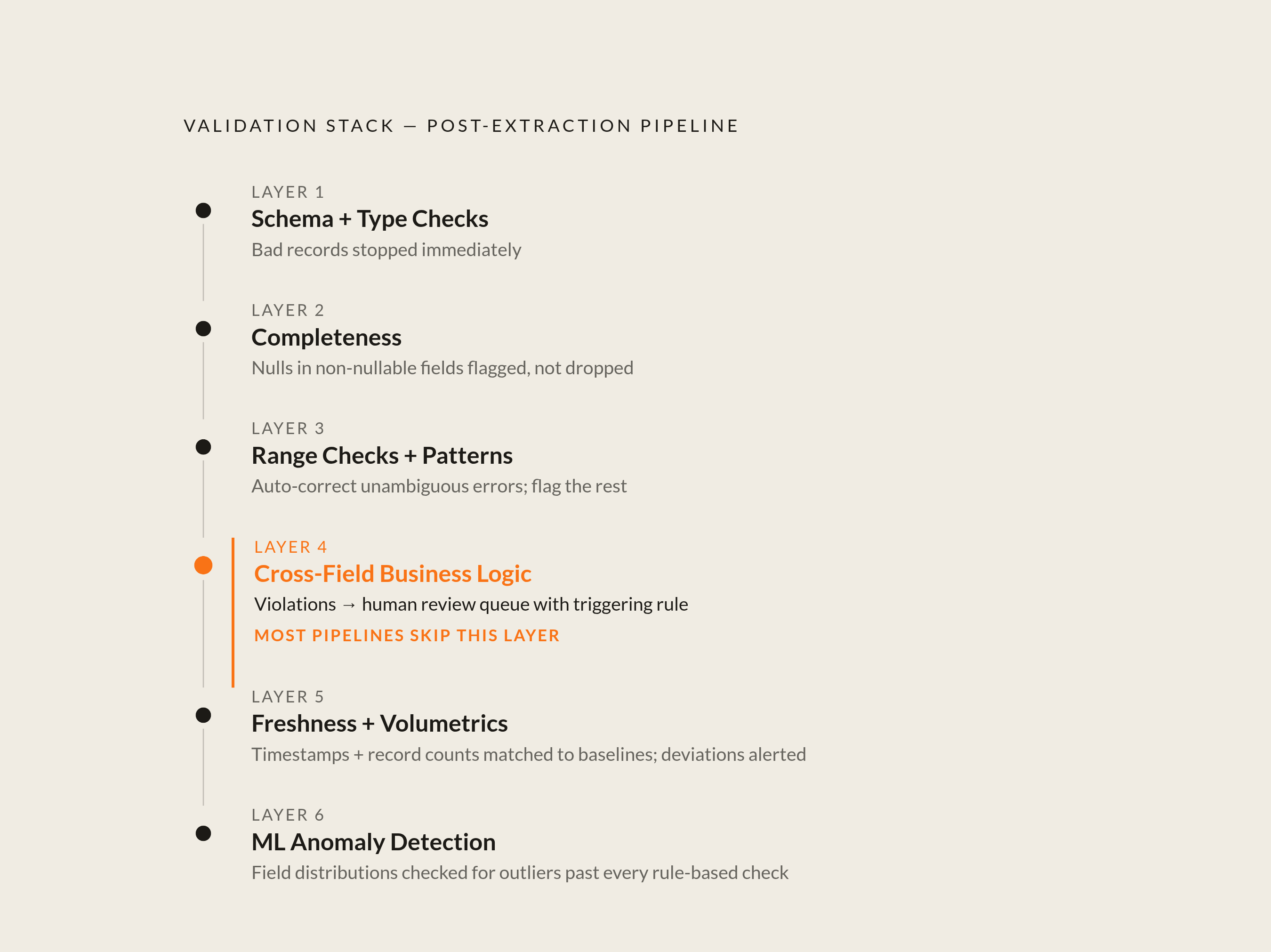
Running validation checks immediately after extraction, before data reaches downstream storage, helps prevent bad records from propagating, so catching errors happens before they hit any downstream store or user.
Layered checks tend to suit typical browser automation setups. Once extraction finishes, the first Layer performs schema plus type checks so no bad record reaches the pipeline. Layer two verifies completeness: fields populated, nulls in non-nullable fields marked for review, not quietly dropped. Layer three handles range checks, validating values against bounds that are defined plus patterns, auto-correcting when unambiguous (like stripping stray whitespace) while flagging the rest. Layer 4 applies cross-field business logic, sending violations into a human review queue with the rule that tripped it. The fifth Layer handles freshness plus volumetrics, matching run timestamps and record counts to known baselines, then alerting about deviations so anyone downstream stops searching for absent data. Layer 6 uses anomaly detection: ML-based checks across field distributions find outliers that cleared each rule-based check yet still seem wrong for a human reviewer.
Run these checks as part of your CI/CD pipeline alongside extraction, not somewhere separate. Any run producing a schema error should stop this pipeline outright, instead of recording an alert no one checks before Friday. And once a dataset has cleared each layer, tag it with a run ID and a timestamp so downstream consumers know which data got validated, and at what time.
Sources
- Top 12 Browser Automation Tools in 2026
Provided the statistics on test cycle reduction (40–60%) and manual work reduction (~70%) cited from the World Quality Report 2024–2025.
- Data Quality Checks: Tutorial & Automation Best Practices
Provided the framework of data quality dimensions and the concept of cross-field validation used throughout the article.
- Data Quality: Dimensions, Impact & Best Practices in 2026
Sourced the list of data quality tools (Great Expectations, Soda, Monte Carlo, Anomalo, deequ, dbt, Databricks, Snowflake) referenced in the rule-based vs. AI-based validation section.
- https://www.tricentis.com/learn/self-healing-test-automation
Informed the discussion of self-healing agents adapting to layout changes and how they shift rather than eliminate the need for human oversight.