Chromium GPU Acceleration Trade-offs in Server Environments
GPU acceleration in Chromium servers requires careful driver setup and carries real security risks.

Chromium's GPU acceleration doesn't simply turn on or off with one switch. It's several distinct pieces (video decode, canvas compositing, and WebGL rendering) that each need their own drivers, flags, and ways to break. Run Chromium on a server or in a container and most of those handoffs quietly fall back to software rendering, even with a perfectly good GPU sitting right there. This piece explains why that happens, what it costs you, why it's worth fixing, and when forcing it becomes a security problem rather than a performance win.
Why headless Chromium does not get GPU acceleration by default, even on a machine with a GPU
Start with the assumption most engineers bring in: if the hardware's there, the browser will use it. It doesn't, not by default, and not because Chromium is hiding it.
No matter what hardware you have, headless mode draws everything in software. That's how it works by design, not a defect. A CI runner with a GPU, like a GitHub Actions box with an NVIDIA card attached, doesn't give Chromium GPU access just because the card is physically present. You have to load the NVIDIA kernel modules first. Miss that step and Chromium doesn't even know there's a GPU to use.
People keep getting caught by the chain of dependencies in Chromium's official GPU docs. The --enable-gpu flag turns off headless mode's forced software rendering, sure, but OpenGL autodetection on Linux still needs an X display, which means the DISPLAY environment variable has to actually be set. Without a display variable, autodetection fails and Chromium reverts to software no matter which flags you passed.
Workarounds exist, but the docs for them aren't equal. Forcing the Vulkan backend with --use-angle=vulkan has been confirmed to work on some Linux setups without any X11 layer at all. --use-gl=egl is a route for accelerated rendering in headless mode, and when it's working, the WebGL report's "Unmasked Vendor" and "Unmasked Renderer" lines will show the actual GPU name instead of something generic pointing at software.
Even with drivers installed and flags set correctly, Chrome's driver validation is so conservative that Linux systems may fall back to software rendering, since Chromium prefers slow rendering over incorrect rendering. From where Google sits, that choice is easy to defend. It's infuriating from the operator's side when nothing in the logs explains why acceleration silently failed.
These flags never stay put. As of Chrome and Chromium 131, the flags needed for video hardware acceleration on Linux changed, and the --use-gl=angle --use-angle=gl combination that used to matter for Intel graphics is no longer necessary. Then Chrome 143 shifted the ground again: hardware video decode is on by default on Wayland now, but hardware video encode is not, so --enable-features=AcceleratedVideoEncoder is still required if encoding matters to the workload. Anyone running long-lived automation pipelines against these flags has to treat them as short-lived. What worked in one release may not last into the next.
The real performance upside when GPU acceleration is working correctly
All this plumbing only matters if the payoff is real. It is, and it's large enough to change architecture decisions.
Musixmatch's engineers ran GPU-accelerated headless Chromium on Kubernetes for a Remotion-based video rendering pipeline and documented a 2x speed-up in rendering time (April 2025). What's worth noting alongside the number is what Musixmatch said about the process itself: there wasn't much existing documentation to work from. It cuts both ways. Teams that set this up correctly gain a real advantage over those still using CPU for software rendering, but little stops "it works" from becoming "it silently fell back to software and nobody noticed."
Browserless has published benchmarks showing page loads running roughly 8x faster with GPU acceleration enabled. Without it, Chrome shifts animation work to the CPU, causing slower loads and animations that look worse, not just slower.
A few years ago, one use case hardly existed at all: running WebGL and WebGPU workloads in headless Chrome on cloud GPU instances, NVIDIA T4s specifically, to drive web-based AI inference. Documentation for this area emerged in January 2024, when the jasonmayes/headless-chrome-nvidia-t4-gpu-support GitHub repo shared a working solution.
You don't get those gains automatically, though. A Q2 2024 Chromium Performance Team internal benchmark report linked enforcing driver version gates and disabling experimental rasterizers to a 92% reduction in GPU-related crashes. Read that the right way: the speed-up isn't a reward for flipping GPU acceleration on. It comes from turning it on plus doing the dull upkeep of keeping drivers updated and experimental code paths off. Skip that upkeep and the same feature doubling your render speed can just as easily double your crash rate.
The software fallback ladder: SwiftShader, llvmpipe, and what each costs
If there's no GPU, or Chromium doesn't trust the one it finds, it doesn't simply quit. Instead, it switches to software rendering, which has multiple levels.
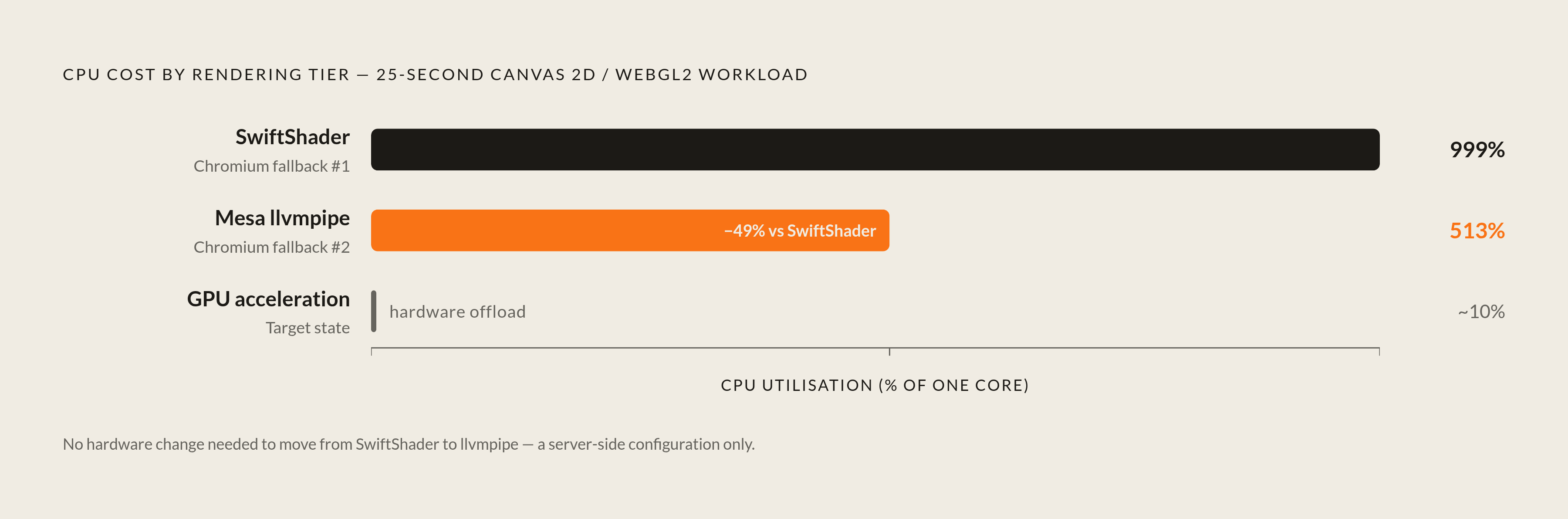
SwiftShader implements Vulkan and OpenGL ES entirely on the CPU. It uses no GPU, which is why it exists, but making the CPU mimic a graphics card costs a lot. A June 2026 server fleet benchmark put a number on it: running a 25-second Canvas 2D and WebGL2 sustained workload under Xvfb, swapping the ANGLE backend from SwiftShader to Mesa's llvmpipe cut a single Chromium instance from roughly 999% CPU to 513% CPU. That cut CPU use by 49%, and WebGL1 and WebGL2 capability survived the switch. Nothing stopped working to hit that lower figure.
Mesa's llvmpipe relies on LLVM-based JIT compilation to deliver OpenGL up to version 4.6, as of Mesa 25.2, and it costs less than SwiftShader across the board for sustained workloads on Linux server fleets. If you run headless Chromium at scale for automation, scraping, or browser-fingerprint work, moving from SwiftShader to llvmpipe is the nearest thing to a free lunch this stack gives you: no hardware swaps, no fewer concurrent sessions, just less CPU burned per instance.
Serverless environments add another wrinkle. SwiftShader enables WebGL in environments like AWS Lambda, where there's no real GPU, but adds real costs: more memory during rendering, higher CPU use for graphics-heavy work, and slower cold starts while the software renderer is initialized.
The story also runs in reverse. In VMs where Chrome wrongly thinks a GPU is present and tries to use it, turning hardware acceleration off has been reported to save around 75% of CPU usage. Same switch, flipped the other way: at times the fix is disabling acceleration, not enabling it.
The takeaway here is that "software fallback" isn't just one thing. It's a ladder of separate steps, each with its own speed and feature trade-off, and defaulting to the wrong one, usually SwiftShader, because it's the one that needs no setup, is a common, easily fixed mistake in server-side Chromium deployments.
Xvfb as a display bridge: what it provides and where it breaks down
Xvfb (X virtual framebuffer) runs the X11 protocol completely in memory. Every graphical operation happens virtually, and to Chromium it looks like a normal X display server running on real hardware. That's the entire trick, and it works well for running headed Chromium builds on headless machines.
By default, Xvfb doesn't give Chromium any path to the GPU. It renders in software, so Xvfb by itself doesn't enable hardware acceleration; it only lets headed Chromium run in a headless environment. When Xvfb handles GLX, it goes through Mesa's llvmpipe (OpenGL up to 4.6 as of Mesa 25.2), which is noticeably slower than an actual GPU.
This is true even on machines with powerful hardware. No matter how it's configured, headed Chromium under Xvfb does not use the GPU rendering pipeline, even on machines with NVIDIA cards.
Watch out for this failure mode when debugging flaky CI: if Xvfb itself fails to start correctly, the runtime may fall back to software rendering. Tests still pass. No error gets raised. But speed quietly falls to software-rendering levels, and unless someone's actively looking for it, that slowdown hides in plain sight.
Resolution matters more than people realize, too. Virtual resolutions of 4K and higher make Xvfb put the whole framebuffer in RAM or swap, and color depth and screen size can push that to hundreds of megabytes per virtual screen. Run several of them side by side during test runs, and Xvfb turns into a memory problem first. Because of all this, Xvfb is the wrong tool for live video encoding, fast animation, or anything that needs quick rendering. That was never its intended purpose.
There's also a slow-developing structural problem. As of 2025, Xvfb remains fully tied to X11, with no native Wayland support, and that becomes a bigger problem as Linux keeps moving toward Wayland compositors. Ironically, Wayland doesn't solve the GPU access problem either right now: running Chromium with --ozone-platform=wayland has a confirmed live issue as of Arch Linux forum reports from May 2025, where GPU acceleration drops out entirely. Software rendering takes over for Canvas, WebGL, WebGL2, and compositing. So right now, the older X11-plus-Xvfb path remains a common route for headless operation, though not for GPU passthrough.
No matter what hardware you have, headless mode draws everything in software.
SwiftShader's deprecation as a WebGL fallback and what replaces it
Prepare for breakage in pipelines nobody set up on purpose: Chromium is retiring its automatic SwiftShader-based WebGL fallback. When GPU-backed WebGL isn't available, WebGL context creation will just fail instead of quietly falling back to a software renderer. That removal is happening now, and since the deprecation period is still underway, the exact cutoff is more of a window than one fixed date.
The Chromium team offered two explanations, both tied to security instead of speed. SwiftShader executes JIT-compiled code within the GPU process, and that creates a real security risk. On top of that, SwiftShader is largely unmaintained at this point and has no mechanism to disable its JIT even for teams that would want to. Pair "runs arbitrary compiled code" with "nobody's actively hardening it" and it's no surprise the team wants it out of the automatic path.
Chromium is moving toward Mesa-based software rasterizers as a long-term fix for Linux software rasterization. SwiftShader isn't going away. Web developers can still turn it on themselves to test headless or GPU-unsupported setups. What's disappearing is the silent safety net. SwiftShader was never designed for untrusted content, and using it as a permanent fallback was never sustainable.
Here's the thing: any server pipeline silently relying on SwiftShader as a default WebGL fallback, without opting in on purpose, is going to break. Not later, not maybe, just sometime during this rollout window. It's better to check this now as a planning task than wait for it to blow up in production. And the swap-in path isn't ready to go yet. Lavapipe still needs work before it's ready, so teams moving off SwiftShader face a gap, not a clean swap.
Stability and crash risk when GPU acceleration is forced on marginal hardware or misconfigured stacks
Enabling GPU acceleration on hardware that can barely handle it doesn't just waste performance. It causes crashes that are really tough to track down.
When acceleration is forced on weak or poorly supported GPUs, Chromium's compositor has to fight the OS graphics stack for the same resources. That fight creates race conditions, and in a GPU process those tend to surface as memory leaks, black video frames that never render, or the renderer process just dying with little explanation in the logs. Trying to debug it from just a stack trace is its own kind of misery, since the failure usually has nothing to do with the JavaScript or the page content supposedly running at the time.
Skipping the checks Chromium built to protect itself deepens the trouble. Flags like --ignore-gpu-blacklist and --use-gl=angle exist to override the validated boundaries Chromium sets around what hardware it trusts, and they're genuinely useful for diagnosing a specific problem on a specific machine. They're not meant for production. Relying on them in production is akin to yanking out a smoke alarm that won't stop beeping, it fixes the annoyance for now, it sets up a far bigger failure later.
This is hard to keep stable partly because GPU driver behavior changes with OS updates and browser version bumps, sometimes with little warning. A setup that's worked fine for months can break after a simple update. That makes acceleration status something to check regularly, not set once and forget: an audit every 90 days, especially after major OS or browser updates, spots drift before it turns into an outage.
You should also track specific limits when running this live. Keep GPU process memory under 700MB when loaded; if it keeps climbing past that during sustained work, something in the pipeline is probably leaking, not rendering. And in enterprise settings on Chrome 124 and later, stability hinges on two things: GPU drivers kept current within roughly six months, and no conflicting flags stacked on top of each other. Enforcing driver version gates and disabling experimental rasterizers is the practice behind the 92% crash reduction figure from the earlier section. It's no accident; the same principle is appearing twice.
GPU code paths as an expanding security attack surface in server deployments
Speed and reliability form one dimension. Security is a separate, and arguably more urgent, one, because GPU code paths have become a genuine target for sandbox escapes and remote code execution in Chromium, not a theoretical one.
That string of CVEs turns the pattern from something abstract into something concrete. Patched in Chrome 142 (November 2025), CVE-2025-12725 in Chrome 142 is a high-severity out-of-bounds write error in Chrome's WebGPU implementation with a CVSS score of 8.8, letting malicious code overwrite critical system memory and execute arbitrary commands. In April 2026, a use-after-free zero-day called CVE-2026-5281 hit Dawn, Google's open-source WebGPU implementation. The National Vulnerability Database says a remote attacker who reached a renderer process could run arbitrary code using a crafted HTML page. CVE-2026-6921 was a Windows GPU component race condition that let malicious video files escape the sandbox, affecting versions before 147.0.7727.117. CVE-2026-10892, patched in Chrome 149.0.7827.53 (released June 2, 2026), was an out-of-bounds write in Android's GPU component, exploitable via a crafted webpage or malicious media file to run code inside the GPU process and fully escape the sandbox.
Drivers aren't off the hook either. In 2025, Google's Threat Analysis Group found attackers actively using two critical Android GPU driver flaws: CVE-2025-27038 in Qualcomm's Adreno driver and CVE-2025-5420 in ARM's Mali driver, both able to let an attacker escape Chrome's sandbox from a compromised renderer process. What's really worrying isn't the bugs, it's how long patches take: Qualcomm and ARM fixes need weeks or months to hit phones since they have to go through OEM firmware updates first.
For servers, the takeaway is concrete and deserves a moment's thought. Enabling WebGPU or actual GPU passthrough on servers handling untrusted user content expands the impact of any renderer breach, since GPU process bugs have a documented history of escaping the sandbox instead of remaining contained. Every performance figure from the sections above has to be measured against that trade. And --disable-gpu-sandbox deserves a flat warning here: it's a local-debugging option, nothing more, and disabling the GPU sandbox in production strips out one of the isolation layers that's supposed to contain exactly the kind of exploit chain described above.
A decision framework for choosing between real GPU, software rasterization, and headless-only paths
So what does this mean for someone choosing a configuration? It hinges on the workload, and the three broad categories usually sort themselves out cleanly.
Real GPU acceleration earns its keep on video rendering pipelines, WebGPU compute workloads, Remotion-style rendering jobs, and web-based AI inference cases. Those 2x and 8x gains cited earlier matter at any production scale, but they arrive only if the whole stack, drivers, flags, display layer, and ongoing monitoring, is validated end to end. Partly set up GPU acceleration is often worse than none, because it can make things unstable without reliably improving speed.
Automation, scraping, and screenshot generation at scale sit in a different spot. Such tasks seldom need enough graphics power to make real GPU passthrough worth the expense and hassle. Usually the smarter first step is testing llvmpipe instead of SwiftShader, because the 49% CPU reduction from the earlier benchmark comes with no hardware procurement changes and no loss of session concurrency.
Right now, serverless functions, AWS Lambda in particular, can only get SwiftShader for WebGL by opting in explicitly, so you either live with its cold-start lag and memory overhead or rework the workload to skip GPU-dependent rendering altogether.
Before shipping anything, run chrome://gpu as a mandatory pre-flight check, no matter the workload. It shows, row by row, whether Canvas, WebGL, Video Decode, and Compositing are truly hardware accelerated or quietly falling back. Managing flags is just as important: split diagnostic and production flags into separate groups, write down which ones you use, and check that list after each major Chromium update, since experimental flags often get renamed or dropped.
Treat the SwiftShader deprecation as a forcing function, not background noise. Rely on automatic WebGL fallback? Move to lavapipe or real GPU acceleration before that fallback vanishes, with a real plan, not afterward. For anything handling untrusted content, weigh the previous section's security posture with the earlier performance numbers: keep the GPU process sandboxed, patch aggressively given the CVE cadence documented across 2025 and 2026, and treat GPU process memory staying under that 700MB threshold as a live monitoring signal, not a one-time check.
You can't boil this down to one rule like "GPU good, software bad" or the other way around. What you're really balancing is a set of trade-offs that shift with what the workload actually needs, and the engineers who get burned are usually the ones who picked a configuration once and never went back to ask whether it still made sense.
Sources
- Chrome Hardware Acceleration: Stable in 2024?
Cited as the source for the 92% reduction in GPU-related crashes figure attributed to a Q2 2024 Chromium Performance Team benchmark.
- Chrome Flags' Latest 2024 Update, Web Browser Video Hardware Acceleration on Linux
Provided details on how GPU acceleration flags changed in Chrome and Chromium 131, including the shift away from the --use-gl=angle --use-angle=gl combination for Intel graphics.
- GPU-Accelerated Headless Chromium on Kubernetes: A Practical Guide | by Devid Farinelli | Musixmatch Blog | Medium
Provided the documented 2x rendering speed-up Musixmatch achieved with GPU-accelerated headless Chromium on Kubernetes.
- https://chromium.googlesource.com/chromium/src/+/refs/heads/main/docs/gpu/swiftshader.md
Cited as the basis for explaining that SwiftShader executes JIT-compiled code within the GPU process, creating a security risk.
- Chromium Docs - docs/gpu/using-gpu-hardware-in-headless-chrome.md
Cited as the official Chromium GPU docs describing the chain of dependencies for enabling GPU access in headless mode.
- No GPU acceleration at all on Chromium Wayland / Applications & Desktop Environments / Arch Linux Forums
Sourced the confirmed live issue with Chromium --ozone-platform=wayland dropping GPU acceleration entirely as of May 2025 Arch Linux forum reports.