Headless Browser Resource Blocking for Faster Scraping
Blocking unnecessary assets cuts scraping time by 2 to 3x and memory use dramatically.

Headless browsers burn 10 to 30 times more time and 10 to 50 times more memory than a plain HTTP call. Most of that overhead pays for rendering nobody asked for: fonts, ad beacons, autoplay video, the whole circus. Resource blocking is the fix, and this piece covers what it does at the network level, what it actually saves in measured terms, and how to wire it up in Playwright, Puppeteer, and Selenium without quietly breaking the scraper you built it for.
What resource blocking actually does at the network level
Resource blocking intercepts an outgoing network request before the browser fetches anything, then kills the ones serving no purpose to the scraper. It isn't DNS blocking, and it isn't a firewall rule sitting outside the browser. The interception happens inside the browser's own network layer, so you can filter by resource type, by URL pattern, or both at once.
Two knobs do most of the work. The first is resource type, the label Chromium attaches to each request: image, font, media, stylesheet, script, beacon. The second is URL pattern, catching known third-party domains like google-analytics, doubleclick, googletagmanager, and fontawesome by substring match, regardless of what kind of file they're actually serving. Combine both and the filter gets broad and precise at the same time.
An aborted request never transfers a single byte, which differs from a request that completes and just gets ignored by your scraping logic, since that one still costs bandwidth even though nothing in the response gets read. This distinction is why blocking shows up on your proxy bill and not just your compute bill: the bytes never enter the proxy connection. You aren't discarding data. You're never fetching it.
The measured performance gains engineers can realistically expect
Start with bandwidth, since it's the number DevTools shows you first. Blocking images and other non-essential assets cuts traffic by roughly 75%, close to four times less data per page, with most of the download simply gone.
Load time follows the same pattern at a smaller scale: blocking images and CSS alone saves around two seconds per page. Multiply that out across ten thousand requests a day, say 100 clients pulling 100 pages each, and two seconds per page adds up to close to six hours of compute recovered, from one category of blocking alone. Practitioners report overall throughput gains in the 2 to 3x range across mixed sites and setups, and on Single-Page Applications specifically, blocking a wider set (images, stylesheets, media, fonts) has been reported to cut scraping time by as much as 10x. Treat that ceiling with some suspicion; it's a best-case number under favorable conditions, not something you write into a budget forecast.
Density tells a bigger story than raw speed does. A 4 GB server running with blocking active typically supports 8 to 10 concurrent pages; without it, the same server supports meaningfully fewer, because every unblocked page drags a heavier memory footprint behind it. Side note, since it trips people up: failed requests eat an estimated 30% of scraping time on average, but that's a retry-logic problem, not something blocking touches. And the pattern that keeps showing up across practitioner writeups is that teams get more speed from blocking unnecessary assets in whatever tool they already have than from switching tools entirely, since optimization beats tool shopping — worth remembering before you burn a week benchmarking three frameworks against each other.
The resource type risk spectrum: what is safe to block and what can break a scraper
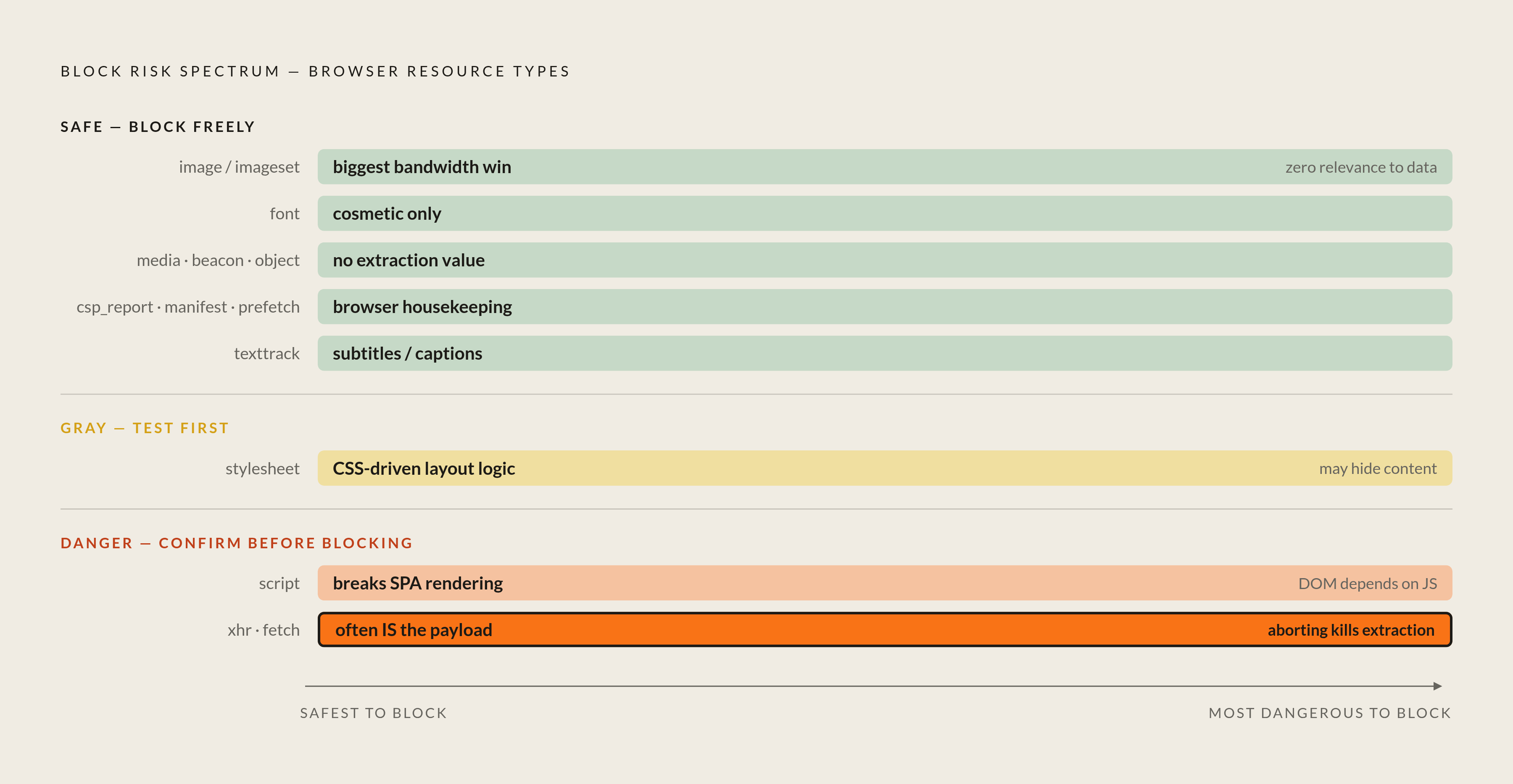
Not every resource type carries equal risk, and the ones that break your scraper rarely announce it. Nothing throws an error; the page loads wrong, quietly, and you don't notice until the fields you extracted come back full of nulls.
Safe end of the spectrum: images and imagesets (biggest bandwidth win, essentially zero relevance to extracted data), fonts and media (no DOM or JS impact at all), and telemetry categories like beacon and csp_report, which come with a small privacy bonus since you're not phoning home to someone else's analytics dashboard while scraping their site. Object, texttrack, manifest, and prefetch round out the safe list with minimal measurable effect.
Stylesheets sit in a gray zone. Usually fine to block, but some sites lean on CSS-driven logic or JavaScript that reads computed style values to decide what renders, so layout-dependent content can vanish without warning, which is why you test before you trust it.
Then there's the danger zone: scripts, and the xhr/fetch categories. Blocking scripts breaks most modern single-page apps outright, since the DOM you're trying to scrape often doesn't exist until those scripts run. Only block scripts once you've confirmed the target renders server-side and your data is already sitting in the raw HTML. Blocking xhr and fetch is worse, because on a lot of modern sites, those requests are the data: page shell loads, fires an API call, populates itself from JSON that arrived over a fetch you just aborted. Inspecting those requests is valuable, but killing them blindly gets you an empty extraction and a mistaken conclusion that the target site changed its layout when really, you just shot the messenger.
Build a candidate block list, run it against a sample of target URLs, diff the extracted fields against a full-load baseline, and only then deploy it broadly. Some teams flip the whole approach: block everything by default, then explicitly allowlist only what the scraper needs. That costs more setup time but buys determinism, which matters more than convenience once you're running the same scraper against a target that redeploys its frontend bundle every few weeks without telling anyone.
Implementing resource blocking in Playwright
Playwright's core mechanism is page.route(), which intercepts requests matching a URL glob or pattern. Call route.abort() inside the handler and the request dies before a byte transfers. Checking request.resourceType() inside that handler lets you abort anything on your block list and route.continue() everything else.
The more interesting move is applying the route handler at the BrowserContext level instead of per page. Set it once on the context, and every page spawned from that context inherits the same rules, with no repeated setup per tab. For a server-rendered target where JavaScript contributes nothing to the data you actually want, you can go further and block scripts globally with something like context.route('**/*.js', ...). Per the risk spectrum above, that's a call you make only after confirming the site doesn't need its own scripts to render.
Layer URL-pattern matching on top of resource-type filtering, catching analytics and ad domains by substring, and you get close to maximum bandwidth reduction without a full allowlist strategy. Playwright's context architecture was built for this kind of scale: hundreds of isolated sessions run inside a single browser process, so whatever you save per session multiplies across the fleet instead of requiring per-instance configuration. The same page.route() pattern works across JavaScript/TypeScript, Python, Java, and.NET, so nobody's forced into Node.js just to get the benefit. Flip it on and watch the Network tab, because the effect is not subtle.
Combine both and the filter gets broad and precise at the same time.
Implementing resource blocking in Puppeteer
Puppeteer works differently, and the difference has a gotcha baked into it. Calling page.setRequestInterception(true) puts every outgoing request into a holding pattern, and it must be explicitly continued, aborted, or responded to, or the page just hangs there. There's no "ignore and move on" default, and I've lost an embarrassing amount of debugging time to exactly this.
Two paths get you there. The built-in interception API is fast to set up and covers most block-by-resource-type needs on its own. For more elaborate setups, the puppeteer-extra-plugin-block-resources plugin adds flexibility for teams running multiple block lists or rules that shift by target site.
Now, the gotcha: in older Puppeteer versions, turning on request interception disables the browser's native cache. Pages that would have benefited from cached assets on repeat visits end up re-downloading them instead, quietly eating into the bandwidth savings you just engineered. Check this against whatever version you're actually running before assuming your numbers match a blog post from two years ago. There's a structural risk too: a request can only be resolved once, so if two interceptor handlers both try to act on it, you get errors and unpredictable behavior. Keep interception logic centralized in one place rather than scattered across middleware. And a subtler trap: some sites use service workers to preload assets before Puppeteer's request listener ever sees them, a blind spot you close by disabling service worker registration at launch or by blocking the registration URL outright.
On raw speed, Puppeteer executes short scripts in around 849 ms versus Selenium's roughly 1,008 ms, a real gap but a modest one, smaller than what blocking itself buys you either way, and it shouldn't be the deciding factor in which tool you pick.
Implementing resource blocking in Selenium
Selenium's native WebDriver API doesn't support request interception at all. To block anything, you go through the Chrome DevTools Protocol, which Selenium 4 finally added as first-class support instead of a bolt-on.
The relevant commands are Network.enable, which turns on network monitoring, and Network.setBlockedURLs, which takes an array of URL patterns like *.mp4, *.css, or *.woff2 and blocks anything matching at the network level. Notice what's missing: no semantic resource-type label. You're not telling Selenium "block images," you're enumerating file extensions and hoping your pattern list covers the site's actual behavior. It's URL-pattern blocking wearing a resource-type costume, and the seams show the moment a site serves images through an extension-less CDN path you didn't anticipate.
CDP access isn't purely a consolation prize, though. Once you're wired into it for blocking, you also get network throttling, heap snapshots, performance metrics, and geolocation emulation along for the ride, useful if your scraper needs any of that anyway. Worth flagging that Selenium's own documentation frames CDP support as a bridge, expected to give way to WebDriver BiDi as that standard matures. Any scraper leaning heavily on CDP-based blocking should keep that logic isolated so it's swappable later instead of woven through the whole codebase. Selenium's baseline execution speed also trails both Playwright and Puppeteer, which makes blocking matter more here, not less, since starting from a higher per-page cost gives the percentage savings more to work with.
Choosing between Playwright, Puppeteer, and Selenium for a blocking-optimized scraper
Blocking capability at scale matters more here than raw speed in isolation, though the speed numbers are worth knowing anyway. In head-to-head scraping tests against identical URLs, Playwright posted a total response time of 2.75 seconds against Puppeteer's 4.37 seconds, a gap attributed to Playwright's habit of batching commands over CDP, which reduces round-trip latency.
Playwright's real edge for a blocking-heavy scraper is structural. Context-level routing applies block rules to every page in a session without repeating setup, and BrowserContext isolation lets hundreds of sessions run inside one process, so savings compound instead of resetting per tab. The multi-language API means a Python or Java shop doesn't have to adopt Node.js just to get there. Resource-type filtering through request.resourceType() is semantic and explicit too, which cuts down on the pattern-matching mistakes that plague URL-only approaches.
Puppeteer earns its keep with simpler setup for teams already living in Node.js, a plugin ecosystem through puppeteer-extra that adds flexibility for specialized block-list management, and closer proximity to the raw CDP layer when fine-grained protocol control matters. Selenium remains the right call for teams with existing Selenium infrastructure where a rewrite isn't worth the disruption. CDP-based blocking gets the job done, just less elegantly, with that BiDi migration question hanging over it long-term.
Worth sitting with, before ripping out a working scraper to chase a framework upgrade: the practitioner consensus keeps landing in the same spot. Switching tools rarely produces the biggest win on the table; adding resource blocking to whatever you already run tends to beat the gains from migration alone. Building something new? Playwright's context-level routing and language flexibility make it the sensible default. Maintaining something that already works in Puppeteer or Selenium? Add blocking first, see how far it gets you, and save the migration plan for a rainy day.
How resource blocking reduces proxy and infrastructure costs at scale
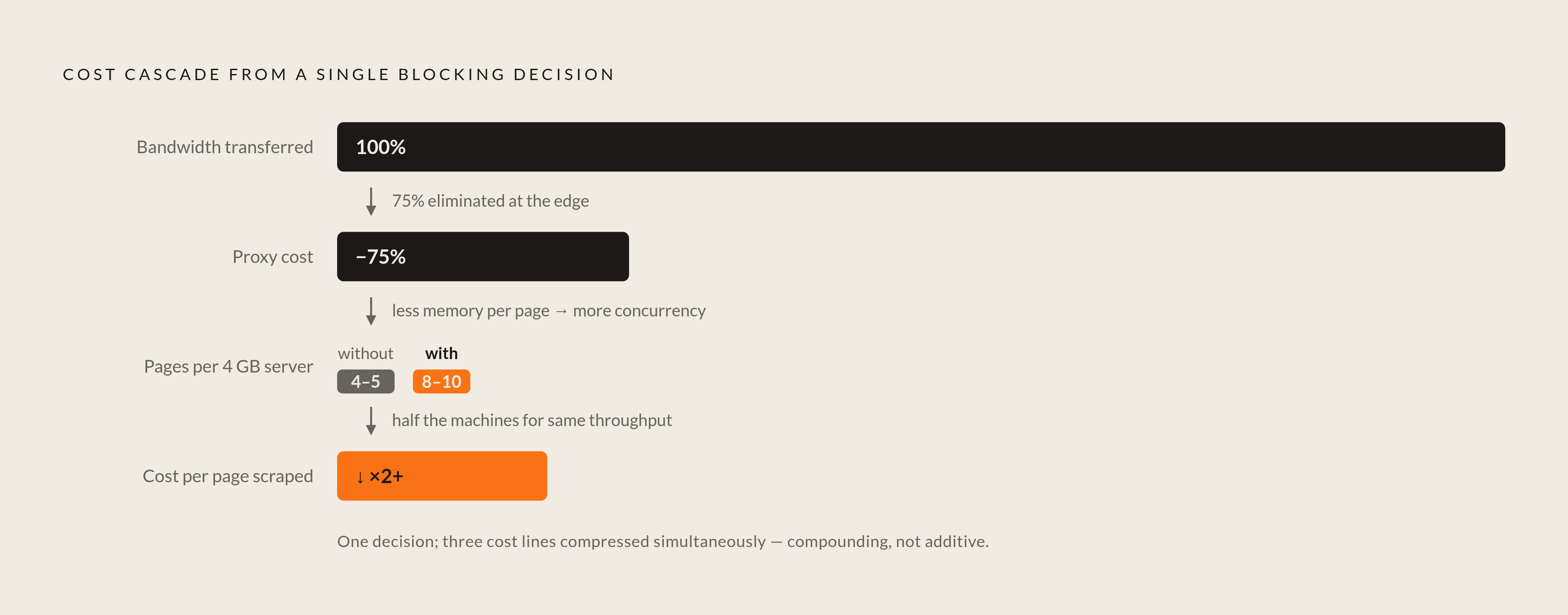
Proxy providers bill by traffic, gigabytes consumed per session, and every image, font, and analytics beacon that passes through that connection is a billable byte carrying zero data value. This is where blocking stops being a performance tweak and turns into a line item on a budget spreadsheet.
The roughly 75% bandwidth reduction from blocking translates close to directly into a 75% reduction in proxy costs for whatever categories got blocked, because those bytes never enter the proxy connection at all. There's no step where the proxy "sees" the request and discards it; blocking happens upstream, before the proxy is ever asked to do anything.
Infrastructure density compounds the savings. A 4 GB server running with blocking active supports around 8 to 10 concurrent pages; without it, that same RAM budget supports fewer sessions, meaning more machines to hit the same throughput target. Those density gains multiply significantly as session counts grow.age 250 MB footprint each require roughly 250 GB of RAM before the operating system or orchestration overhead takes its cut. Shave the per-instance footprint through blocking, and the fleet needs fewer physical or virtual machines to hit the same daily volume — not a theoretical saving, but a headcount-of-servers saving.
The effect compounds in a way that's easy to underestimate at a glance. Lower memory per instance means more sessions per server, which lowers cost per page scraped, which lowers the proxy bill per page. The economics improve non-linearly as the fleet grows, not in a straight line, and that's the part spreadsheets tend to miss when someone models it as a flat percentage. Managed scraping services and cloud-based headless browser platforms bill on traffic consumed too, so none of this is a workaround unique to self-hosted setups. It's one of the few cost levers that applies no matter who's running the Chromium instances underneath you.
Sources
- https://www.browserstack.com/guide/playwright-block-request
Provided the detail on applying route handlers at the BrowserContext level so every page in a session inherits block rules without repeated setup.