Headless Browser Cold Start Latency on Serverless Functions
Chromium's cold starts on Lambda stretch 5 to 15 seconds, making synchronous tasks impractical.

Serverless was meant to make provisioning machines you do not use unnecessary. When something triggers the function, that platform scales automatically, and you only pay while execution runs. Spinning up Chrome or Chromium in AWS Lambda to make PDFs, grab shots, or pull what a site shows, fails that pledge at its root, and no cut to the code repairs it. Rather than picking Lambda automatically, you should pick a deployment model that fits your workload, and that's what follows.
In a cold start case, each serverless platform must set up another execution environment instance from scratch: runtime boot comes first, dependencies load, the app starts, then the handler can run. For a standard function, like a REST endpoint or queue handler, code reshaping a JSON payload runs in a few hundred milliseconds, then shrinks more with a smaller bundle or quicker runtime. Chrome doesn't fit that pattern. This program targets full computers: tracking things while you use it, starting network links and extra tasks, staying loaded until you tap again. Telling Chrome to boot fresh on request within a 250 MB deployment limit forces it into a role it was never meant to play.
The binary size problem that makes Chromium incompatible with standard Lambda deployment limits
Start by looking at the actual figures, since they won't change. The zip deployment limit for AWS Lambda's is 250 MB. Vercel's Edge Functions set an even tighter limit of 50 MB. Chromium alone takes up about 300 MB, before any app instructions are even included. No smart packaging hack alters the math, so the size limit gets broken before anyone writes a function.
In Node, the usual workaround is the sparticuz/chromium package, which delivers one Chromium binary in Brotli-compressed form that's extracted while running rather than kept uncompressed on disk. That size problem is solved. But it comes at a cost: opening it takes 3 to 5 seconds on a fresh run, before Chrome is running, before any page is open, before rendering begins.
Count those numbers and things come into focus. With Chromium-based Lambda, it usually takes 5 to 15 seconds before it answers, and it's typical, not some unusual bad result. Launching Chrome, after decompression finishes, adds roughly 3 to 6 more seconds. If a user needs synchronous results, those numbers represent the floor rather than the ceiling. A person requesting the invoice PDF through a site watches a spinner during the full browser boot. Works for nightly batch processing behind the scenes. Useless for anyone who taps a submit button.
Memory and CPU requirements that push headless functions against Lambda's resource ceiling
Most of these deployments fail because people act like a shoestring budget lets Chrome run. It asks for around 2 GB in RAM to run without trouble and about 2 CPU to show pages without freezing, so you end up setting the Lambda far above what most jobs take, paying more on each call.
Lambda's overall budget is roughly 10 GB of RAM plus six vCPUs, meaning a lone headless browser workload eats an outsized slice of the platform's setup just to drive one render. Disk strain still compounds it: Lambda's tmp directory usually defaults at 512 MB; each single browser session may take over 1 GB, and that temporary area is not kept across invocations. Each cold start goes back to square one, without fail.
Even with the server already up, opening a new browser takes 200 to 400 ms until rendering kicks off. It works alone. When concurrent load brings simultaneous render calls, each spinning up a fresh browser, the overhead compounds toward a throughput ceiling since the platform fails to scale fast enough, plus every one of those instances eats gigabytes of RAM all at once. Browsers aren't stateless functions. It keeps sockets open and spawns subprocesses; using it as a small lightweight handler brings the odd, unpredictable problems that come with sudden load. You can dodge this entirely with Keep-alive tricks that leave instances warm, though they bring their own problems we'll revisit soon.
What benchmark data shows about warm-path performance and why it makes cold starts hurt more by contrast
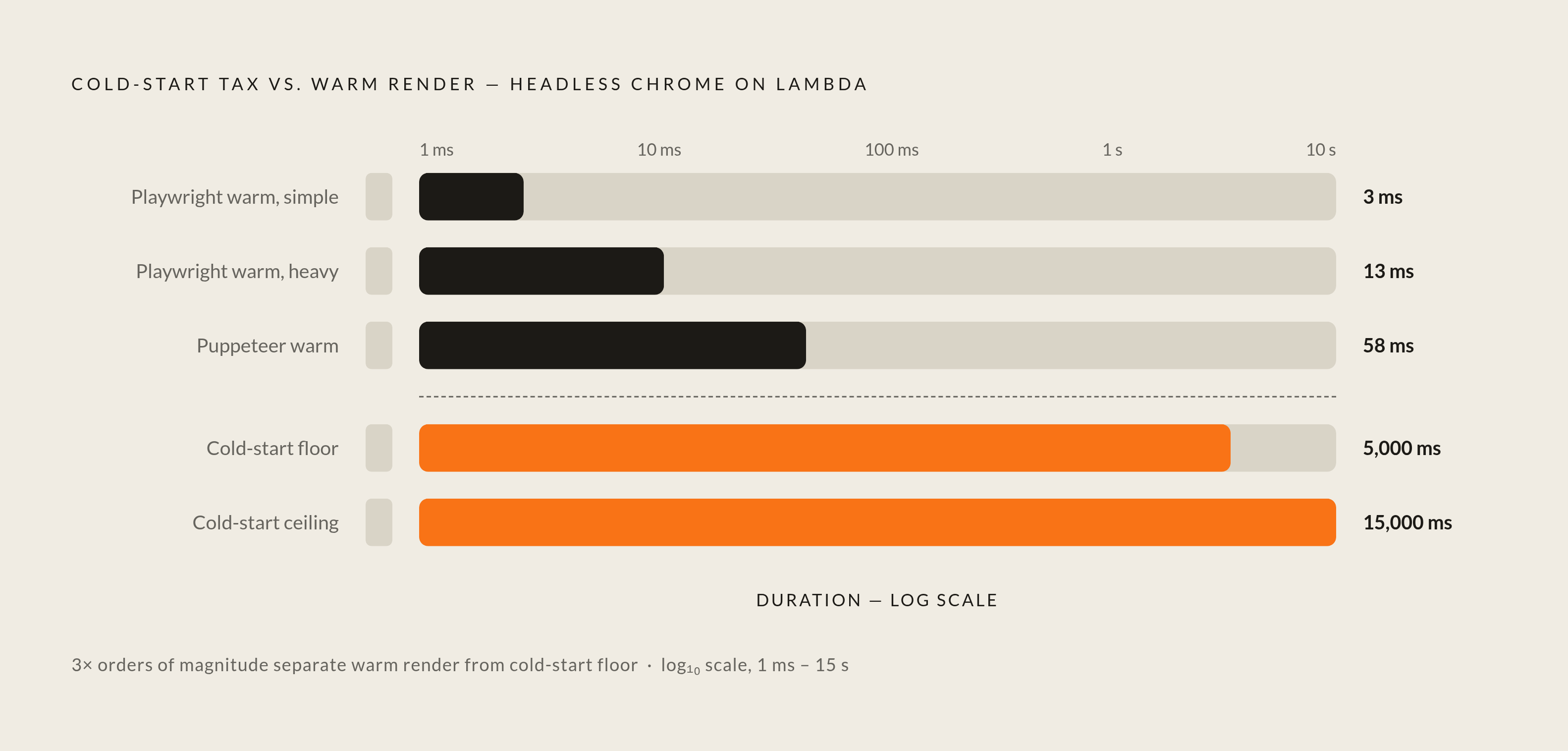
When the browser gets warm, the results reverse, making that cold-start cost seem absurd. In 2026 HTML-to-PDF rendering tests (pdf4.dev), Playwright's heated runs took 13 ms on a heavy page and only 3 on an easy one, faster than many backend operations. Puppeteer ran 58 milliseconds warm, fast still, but with extra per-render overhead built in compared with what Playwright has. WeasyPrint, meanwhile, needed 629 warm milliseconds, but its output was the least large of them (21 KB versus Playwright's 125 KB for that same page). Because the tool spawns its own worker each render, quick warm-path runs were out of the question from the start.
Set 13 milliseconds against a 5 to 15 second cold start and the scale of the problem stops being abstract: the tax paid just to boot the environment runs about three orders of magnitude larger than the rendering work it's paying for. Measured against that, Puppeteer's gap versus Playwright on the warm path, slower, is far smaller, not separated by orders of magnitude, and the one to weigh when choosing for a warm-path-heavy workload.
A caveat about approach, because this matters to people checking nearby: that benchmark showed Linux aarch64 on Docker with Apple Silicon was slower by 30 to 70% compared with macOS arm64, mainly because of the virtualization overhead in Docker Desktop. Before trusting a benchmark run on your machine over one from Lambda's live environment, keep that gap in view, since such results won't map cleanly.
Platform data shows how severe cold-start delays become. A study covering 85 billion customer calls plus 11.9 million spin-ups for Huawei's cloud service showed startup above 7 seconds across some areas, caused mostly by package setup and waiting. Because binary size and RAM are stacked against them too, headless browser functions can experience significant cold-start delays.
Playwright vs. Puppeteer in a serverless context, and how Chrome's 2024 headless architecture change affects both
Puppeteer and Playwright both solve overlapping issues with separate philosophies. Playwright runs all three engines from one API, made for anyone chasing cross-browser reach. Puppeteer keeps a Chrome-first focus, needs fewer packages, and comes straight from Google's Chrome crew. Right now, Puppeteer has v25.1.0, targeting Chrome 149, and has 94,423 GitHub stars. Use Puppeteer specifically for serverless work. Its smaller footprint makes more sense, full stop; Playwright's multi-engine support has real value in cross-browser testing but becomes dead weight when a Lambda deployment gets punished by Lambda's size rules.
Something more consequential happened during 2024, and its effects still ripple across each serverless deployment that uses headless Chrome. Starting with Chrome 112, "new headless" mode stopped being a stripped-down shell and started running the full Chrome browser under the hood. Chrome 132 dropped that old, lightweight headless mode. That full browser is the default today. You can still get that basic version, but it ships as its own program named "headless-shell for chrome", so groups chasing less RAM and faster boots must pick it on purpose, and few do.
It passes by without notice, yet it counts. If your group never revisited the Chrome configuration after 2024 ended, you're probably loading the full browser within a single Lambda function instead of that lightweight one: a hidden regression causing slower cold starts plus extra RAM demands, though nothing in your scripts changed.
For anyone with a latency budget under 150 milliseconds at the 95th percentile, runtime choice matters as much as browser choice. Go, Python, Bun, Deno, and Node suit hosts designed for quick sandbox spin-up, like Cloudflare Workers, Edge on Vercel, plus Lambda using SnapStart or Concurrency set to Provisioned..NET and similar platforms bring a CLR or JVM boot cost that makes them a bad fit for cold-start-sensitive browser workloads.
Start by looking at the actual figures, since they won't change.
Mitigation strategies that work within the serverless model, and what each one actually costs
The gap stays no matter which option you pick. Every option gives up cost, extra steps, or overhead to get a better p95. Which one fits rests entirely on your workload staying synchronous, or if it can tolerate work in the background. Ignore that choice and you end up overpaying for a fix this workload doesn't require.
Provisioned Concurrency offers the simplest fix: AWS keeps a bought group of execution slots ready, initialized, and warm, which makes cold starts stop for the level you buy. You pay a set amount rather than usage-based billing. A 1 GB function held at 5 provisioned instances runs around $220 a month before a single invocation happens, which eats straight into the pay-as-you-go advantage that made serverless attractive in the first place. It makes sense for a synchronous, user-facing workload where you know the concurrency floor ahead of time. Skip it in other cases, since most groups grab for it without running the math.
When functions must run inside a separate isolated network environment because of data residency needs, Hyperplane's ENIs cut the cold start time, dropping it from over 10 to under one. This meaningful fix matters only for teams unable to run anywhere but an isolated network.
Bundling and code trimming assist as well, even though they address an issue separate from the Chromium binary. Using Rollup to drop code you don't use, plus pulling in big libraries only when the function runs instead of at the start, speeds up how fast packages start. FaaSLight, an optimization tool for code-loading, dropped load latency by as much as 78.95% (around 28.78%) and reply latency by as much as 42.05% (around 19.21%), beating earlier work in that study by 21.25x. Typically a solid win when functions are dependency-heavy. Even a perfectly cut bundle won't help, since decompressing the 300 MB Chromium binary stays its own bottleneck.
Forecast-based keep-warm methods are the next edge. Forecast-based scheduling methods have been shown to reduce cold-start latency in certain scenarios. AI-driven scheduling methods built on reinforcement are being explored for this, adapting allocation as demand shifts over time, though such work remains in academic papers rather than in tooling people can use now.
A couple of minor techniques finish things off. Doing the initialization inside the handler instead of at module load time prevents that overhead from stacking with browser initialization when a cold start hits. Sending regular requests to keep your code awake does the job, yet you must build your own clock setup and pay all the time, ending up near what Provisioned Concurrency charges at serious volume.
When to stop fighting the cold start and move to a different deployment model entirely
The line between them is clear, even when the tools supporting it aren't. For asynchronous background work like nightly PDF batches or timed screenshot runs, Serverless headless browsers fit perfectly, since nobody's watching a spinner for the output. They simply stop working once a user needs synchronous results, full stop: cold-start variance becomes a poor outcome, and more retrying or extra tuning can't fix the math.
For rendering in real time, drop Lambda. A long-lived service with several open browser instances is quicker and easier to manage than Lambda plus Provisioned Concurrency, since the browser is kept ready without costly tricks. Cloud Run is the natural compromise: full container ownership, no Kubernetes required.
Cloudflare's Browser Rendering went live for everyone in 2024, giving you another way: running Chromium inside a Worker via an API that is Puppeteer-compatible, avoiding any cold start plus binaries you handle yourself. For Cloudflare-based rendering with modest traffic and tight response-time requirements, this is the best choice available today.
Pass the whole thing to a vendor that exists for this purpose: that's what managed browser infrastructure offers. Browserbase runs managed headless browser instances for automation workloads and offers an open-source SDK called Stagehand. It runs between free tier access for a single concurrent browser and Developer at $20/mo for 25 concurrent uses plus 100 browser hours, billed by browser time unit, with Developer overage at $0.12/hr and Startup overage at $0.10/hr. Browserless goes another way: actual Chrome, Firefox, plus WebKit through WebSocket and REST, so your Playwright or Puppeteer scripts just point at it, and you pick either managed cloud hosting or self-hosted Docker deployment. Launched close to 2017, the service reports about $4M ARR and bills by concurrency, giving a free tier of 1,000 units each month and plans that span $25/month to $350 per month. Between them, Browserless has been around longer for folks who specifically self-host their setups, and once self-hosting turns non-negotiable rather than merely desired, Browserless stands alone.
Costs differ depending on who sells it: minute-based charges (Browserbase), concurrency-based fees (Browserless), unit, GB, IP, and request charging show up with other providers, and some include automatic challenge handling while others leave it out.
What matters is workload pattern, not the vendor picked. Asynchronous, low-volume, cost-sensitive work fits serverless running @sparticuz/chromium, cold starts included, because there, Provisioned Concurrency means cash going toward a problem nobody's stuck solving. Synchronous, latency-sensitive work, with its predictable concurrency floor, needs either Provisioned Concurrency, or a Cloud Run container, and after adding up both bills, groups pick the container more than they thought. Latency-sensitive work living inside Cloudflare's setup belongs on Browser Rendering. A managed platform, either Browserbase or else Browserless, fits AI workloads plus groups lacking bandwidth needed to run custom browser infrastructure. Wherever rules or the need for data residency can't bend, running Browserless yourself on Docker turns out to be the only way to keep the data put.
Sources
- 12 Serverless Cold-Start Fixes That Actually Work in 2025 | by Thinking Loop | Medium
Provided the cold-start timing figure cited when describing the cost of extracting the Brotli-compressed Chromium binary.
- (PDF) Cold Start Performance in Serverless Computing: A Comprehensive Cross-Provider Analysis of Language-Specific Optimizations and Container-Based Mitigation Strategies
Provided the Huawei cloud study figures (85 billion calls, 11.9 million spin-ups, 7-second startup) and FaaSLight latency-reduction percentages cited in the article.
- AWS Lambda Cold Start Optimization in 2025: What Actually Works
Provided the $220/month cost figure for holding five provisioned Lambda instances warm.
- https://pdf4.dev/blog/html-to-pdf-benchmark-2026
Provided the 2026 HTML-to-PDF benchmark figures for Playwright, Puppeteer, and WeasyPrint warm-path render times and the 30–70% Docker virtualization overhead finding.
- https://thebrowserlayer.com/posts/headless-browser-pdf-generation-in-production
Provided the invoice PDF user-experience example illustrating synchronous cold-start pain for end users.
- GitHub - Sparticuz/chromium: Chromium for Serverless Platforms
Described the sparticuz/chromium package that delivers a Brotli-compressed Chromium binary for serverless deployment.
- https://sliplane.io/blog/5-awesome-browserless-alternatives
Provided Browserless pricing details including the 1,000 free units per month and the $25–$350/month plan range.