Headless Browser Output Caching Strategies for Repeated Renders
Skip duplicate renders at scale, or watch the same compute costs stack up across every request.

Every headless browser render costs about a second of server time, and that second gets billed twice if the same page renders twice for no reason. This piece walks through the layers that stop that from happening: browser-level disk cache, in-memory and Redis-backed output stores, CDN edge caching, and the invalidation logic that keeps all of it honest. Trendyol's dynamic rendering pipeline handled 2 billion page renders in a single year, a volume where uncached re-rendering stops being a rounding error and starts being a line item someone has to explain in a board meeting. Skip caching, and you pay for the same compute job twice, forever, at scale, which is a strange way to run infrastructure on purpose.
Here's why the second matters so much: mobile users abandon pages that take more than 3 seconds to load at a rate of 53%, and every additional second of load time costs roughly 7% in conversion. Even 100 milliseconds of added latency can shave about 1% off revenue. None of that is abstract when a render pipeline sits between a user and a page, and getting the cache wrong means the cost shows up in the numbers above. Get it right, and the render gets paid for once instead of on every single request that walks through the door.
The four output types that shape cache policy
Headless browser workloads tend to produce one of four things, and treating them the same way is the first mistake worth naming.
HTML snapshots are the most common: dynamic rendering served to crawlers, or server-side pre-rendering served to users. Freshness matters here, and the cache key has to include the URL plus something that distinguishes user-agent classes, since a crawler and a browser might need different snapshots of the same route. PDFs sit at the other extreme. An invoice or an exported report gets generated once per document version and never changes again, so the cache hit potential runs close to total, and caching it indefinitely carries little risk. Screenshots and images, including Open Graph cards and visual regression baselines, land in between: stable for a given content version, expensive to regenerate the moment that version changes. Then there's scraped DOM output, structured JSON pulled from JavaScript-rendered pages, where freshness depends entirely on how often the source updates.
A single TTL applied across all four is the wrong call, and it's worth being blunt about that. A PDF invoice can sit in cache forever with a version key attached; an OG image should get invalidated the instant the article metadata behind it changes, which argues for an event trigger over any fixed window; an HTML snapshot for a product page with live pricing might need to refresh every few minutes or it starts lying to shoppers about what they're about to pay. One global rule either wastes render cycles babysitting content that never moves, or serves stale prices to someone mid-checkout. That's the case for a layered cache setup instead of one blanket policy, and it's the frame for everything below: each layer handles some of these output types better than others.
Browser-level caching: reusing what Chrome already fetched
Here's the detail that gets skipped most often: Chrome keeps its own HTTP disk cache, and headless render pipelines routinely throw it away between jobs without anyone noticing. That's a bit like reheating a full pot of coffee every time you want a single cup.
The dominant cost in a render is network and asset retrieval, not computation, so any technique that avoids re-fetching the same CSS file, the same font, the same tracking script across render jobs is going after the actual bottleneck instead of a decorative one. Two changes make this concrete. First, swapping browser.close() for browser.disconnect() keeps the underlying Chrome process alive between jobs instead of tearing it down; Keeping the Chrome process alive between jobs preserves the disk cache across renders. Second, pointing Puppeteer at a persistent userDataDir means cache and cookies survive across sessions, so a resource fetched once loads from disk the next time instead of going back over the network.
Browser instance pooling is the natural next step, and skipping it is the second mistake worth calling out directly. Launching a fresh Chrome process for every job carries overhead that has only grown as Chrome and Puppeteer add features, so avoiding repeated launches matters more today than it did a couple of years ago. Purpose-built instance pool libraries are a working example: they manage a pool of Chrome instances with rotation and retirement rules, so reuse improves throughput while retirement stops the kind of slow memory leak that eventually takes down a whole worker node. Pools sized to a handful of instances, with idle timeouts and basic load balancing, are the standard shape for high-volume services.
None of this reaches past a single node, though, and across pods, or on stateless infrastructure where every request might land on a different machine, disk cache reuse does nothing, because there's no shared disk to reuse. Which raises the next question: once assets stop being re-fetched needlessly, should the whole render even happen again?
In-memory and distributed caching of render output
Two flavors of application-layer caching answer that question. One caches the fully rendered HTML for a route in Node's own memory: simple, zero network round-trips, but only clean on a single-instance deployment. The other caches structured JSON, smaller and easier to key and invalidate, from scraping or API-driven routes.
The pattern in practice typically involves intercepting the render pipeline at two points: checking for a cached result before the render runs and skipping it entirely if one exists, then storing the fresh result keyed by URL after the render completes the pipeline. Because different content types age at different rates, well-designed systems let custom caching strategies be injected rather than forcing everything through one flat URL-keyed map.
In-memory caching falls apart the moment there's more than one instance running, and this is where a lot of teams get burned without realizing it until traffic spikes. The cache doesn't survive a pod restart, and every new instance has to build up its own warm cache from cold, independently, at the same time every other instance is doing the same thing. Redis, used as a shared render-output store, addresses both problems at once. The response times make the case without any help: a typical headless render call takes around 1.5 seconds, while a cache hit returns in a fraction of that time. That gap, roughly three orders of magnitude, is the entire business case for this layer, full stop.
Here's the catch, though: the moment the source data changes, that Redis entry starts lying to every request that hits it, and keeping the cache honest without giving up the speed is the real problem, covered in the invalidation section below. Worth naming a third pattern here too: pre-rendering on a fixed schedule and storing the result ahead of time so no live request ever waits on a render. Works well for content on a predictable clock, a daily digest page, say, and works badly for anything event-driven.
Headless browser workloads tend to produce one of four things, and treating them the same way is the first mistake worth naming.
CDN and edge caching of rendered HTML
Serving a cached render from a CDN edge instead of running it live again produces a speed difference that shows up on user devices, not just in server logs. Chrome's own server-side rendering benchmarks measured First Contentful Paint arriving 8.37 seconds faster than the client-side rendering equivalent, under simulated Slow 3G. That's the kind of number that decides whether a page gets abandoned before it finishes loading at all.
CDN caching is also the layer most prone to quiet misconfiguration. Modern rendering patterns, incremental static regeneration, streaming server-side rendering, edge functions, sit somewhere between fully static and fully dynamic, and figuring out what to cache, for how long, and when to revalidate isn't obvious under any of them. One wrong header can serve a CDN's entire audience yesterday's data, or, in the opposite failure, collapse the hit rate to nearly zero because a session cookie snuck into the cache key.
The Vary header is where this tends to go wrong, specifically. Cache-Control tells a CDN whether to cache a response at all; Vary tells it which request headers should count as producing a different response. By default, the cache key is just method plus URL, and listing a session token in Vary makes the cache quietly fragment into one entry per user, which defeats the entire point of caching in the first place. Support for Vary isn't even consistent across providers, and behavior can differ significantly from what the documentation describes. Test this against whichever CDN is actually in use, and don't take the documentation's word for it.
Frameworks that split rendering into multiple separately cacheable payloads introduce a related failure mode: if the CDN caches each piece with a different TTL, a user can end up looking at mismatched content. The fix is to cache related pieces together with aligned TTLs and respect the Vary header rather than work around it.
A few rules hold up across most of this. Use immutable URLs with version tokens for static assets, and content-version tags for rendered documents, so a cache key changes exactly when the content does and never otherwise. Skip global cache purges; object-level or tag-based eviction clears what actually changed instead of wiping everything and forcing a stampede of re-renders (more on that failure mode two sections from now). And set cache windows against the actual business requirement, "product price has to update within 3 minutes," say, rather than picking a TTL because it's a round number.
Choosing an invalidation strategy to match content volatility
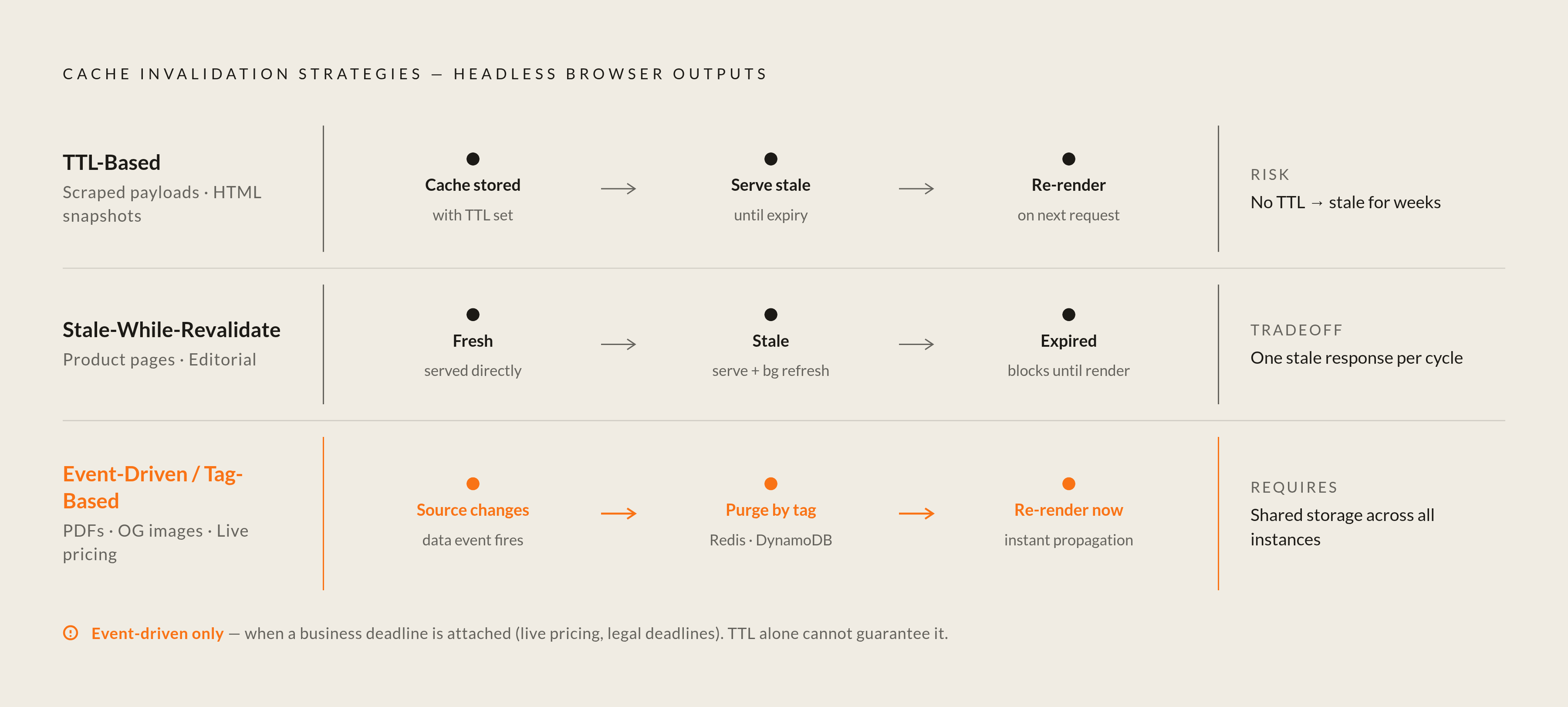
Three invalidation strategies cover most cases, and picking the wrong one for a given content type is where a lot of caching setups quietly go stale for weeks without anyone noticing.
TTL-based expiration is the simplest: Redis drops a key automatically once its duration runs out. The trade-off runs in a straight line: shorter TTL means fresher data and more render work, longer TTL means fewer renders and a longer window where stale content might get served. One rule matters more than the rest here, and it's the one worth being firm about: never cache without a TTL unless there's explicit invalidation logic standing in for it. Skipping the TTL is probably the single most common cause of permanently stale content quietly served to users for weeks at a stretch. This strategy fits scraped payloads and HTML snapshots best, anywhere a little staleness is tolerable.
Stale-while-revalidate handles the case where staleness is fine but latency isn't. It serves the cached output right away, even slightly old, and kicks off a background re-render at the same time, so the user never waits on a render job. Three states are worth naming here: fresh, served directly with no extra work; stale, served immediately while a refresh runs behind the scenes; and expired, which blocks the request until a fresh render actually completes. Since Redis only supports one TTL per key, implementing SWR means encoding fresh_until and stale_until timestamps inside the stored value itself, with the Redis TTL set to cover the full stale window. This fits product pages and editorial content well, anywhere a user should never feel a render happening in real time.
Event-driven, or tag-based, invalidation trades simplicity for immediacy: the moment source data changes, the corresponding cache entries get deleted or updated directly, no waiting on a clock to run out. In a distributed deployment, the invalidation event needs to live somewhere every instance can see it (Redis, DynamoDB, or a lightweight HTTP endpoint) so no instance keeps serving a stale entry just because it wasn't the one that triggered the update. Some frameworks expose tag-based invalidation functions that work exactly this way: an invalidation event gets written to shared storage, and every other instance checks against that record on its next request. This strategy fits PDFs and OG images, where freshness tracks a specific content event rather than a time window.
None of these three work without a cache key that's actually deterministic, and the key needs to include every dimension that changes the output: URL, user-agent class, locale, content version. Miss one, and event-driven invalidation has no way to know which entries to target.
Picking TTL by default because it's the easiest to wire up is a common misstep worth flagging. TTL suits scraped payloads where nobody's checking the clock. Anything with a real business deadline attached, like pricing, calls for event-driven invalidation, even though it takes more plumbing to build.
Cache stampede: the failure mode specific to render caches
A cache stampede happens when a cached value expires and a pile of concurrent requests all try to regenerate it at the same moment, sending a spike of identical, expensive work at the backend all at once.
For most systems, that regeneration is a database query, cheap enough that a stampede is barely an annoyance. For a render cache, regeneration means a full browser render, roughly a second of server time each, and that's where the same failure mode turns into something with a genuinely dangerous blast radius. Picture a high-traffic page whose cache entry expires mid-spike: every request that misses the cache in that window kicks off its own render job, and the render cluster saturates before a single one of them finishes. Nobody gets served, and the caching layer that was supposed to make things fast becomes the outage.
Three mitigations handle this in practice, and skipping all three is the most common way teams find out about stampedes the hard way. Mutex or single-flight locking means that on a cache miss, one request acquires a lock and renders, while every other request waiting on that same key just reads the winner's result instead of each kicking off its own render. Probabilistic early expiration starts a background re-render before the TTL actually runs out, with the odds of triggering it rising the closer the deadline gets, which spreads the re-render load out instead of letting it all land on one instant. Stale-while-revalidate, already covered above, doubles as stampede protection almost by accident: because there's never a moment where the cache is truly empty from the caller's point of view, there's no hard expiration cliff left to trigger a stampede in the first place.
Stampede risk scales with both render time and concurrency, which is why a headless render API call at around 1.5 seconds under heavy concurrent load is a fundamentally different risk profile than a 50-millisecond database read under the same load. Teams using managed render APIs offload some of this risk to the vendor, but the cache layer sitting in front of that API still needs its own protection regardless.
Managed render APIs and where they shift the caching responsibility
Several managed headless browser services build output caching directly into the product now, rather than leaving it for the customer to bolt on afterward.
Firecrawl includes caching as part of its scraping pipeline, with a maxAge parameter controlling how fresh a result needs to be; repeat requests for content that hasn't changed can return up to 5 times faster, and a fresh render runs once the cache window expires. RenderKit controls cache behavior through a cache_ttl parameter, and an identical render request that hits the CDN layer instead of spinning up a browser returns far faster than the roughly 1.5-second render path without triggering a new render, a meaningful distinction for anyone paying per render. Browserless takes a different approach: each call to its /screenshot, /pdf, or /content endpoints spins up an isolated Chromium instance and throws it away the moment the response goes out, leaving output caching entirely to whoever's calling the API, rather than something the service handles on your behalf.
That split is worth sitting with, because it's really a decision in disguise. Some vendors sell caching as part of the product; others sell the render itself and leave freshness and reuse to the customer, full stop. And the second group isn't doing less work, they're just handing the work to someone else's engineering team. Neither approach comes free of tradeoffs, and each demands a different amount of engineering effort on the client side. For a team running a handful of low-traffic routes, Browserless plus a home-rolled Redis layer is probably cheaper than it sounds. For anyone at Trendyol's kind of volume, paying for a vendor that already solved this is very likely the better trade. Picking between them comes down to how much of this article a team wants to build itself versus pay someone else to have already built.
Sources
- https://www.xictron.com/en/blog/store-api-caching-headless-shopware-performance-2026/
Provided the 53% mobile abandonment rate, 7% conversion loss per second, and 100ms latency figures cited in the opening section.
- https://developer.chrome.com/blog/headless-chrome-ssr-js-sites
Provided the 8.37-second First Contentful Paint improvement figure from Chrome's server-side rendering benchmarks cited in the CDN section.
- https://medium.com/trendyol-tech/rendering-2-billion-pages-with-a-headless-browser-for-dynamic-rendering-acda7d254157
Provided the 2 billion page render volume example and the 1% revenue impact of 100ms latency, both cited in the opening section.
- https://www.browserless.io/pdf-screenshot-screencast
Described Browserless's per-endpoint isolated Chromium instance model referenced in the managed render APIs section.
- https://en.wikipedia.org/wiki/Cache_stampede
Informed the explanation of cache stampede mechanics and the mutex/single-flight locking mitigation described in the stampede section.
- https://cseweb.ucsd.edu/~avattani/papers/cache_stampede.pdf
Provided the basis for the probabilistic early expiration technique described as a stampede mitigation strategy.